After reducing the font files used by the WordPress homepage, I found that visitors were still downloading the old files as well. The optimized HTML contained 24 preload tags for the previous font subsets. Removing those unnecessary hints was followed by a mobile PageSpeed score of 91, up from 54, and an LCP of 2.853 seconds, down from 19.582 seconds.
The new font bundle had loaded correctly. My initial checks had missed what else the final page was telling the browser to download. This case follows that mistake, the narrowly scoped fix, and what the measurements do and do not establish.
Check whether the old fonts are still being preloaded
A font subset contains some of a typeface’s characters. Korean fonts contain many characters, so splitting them into separate files lets the browser request the subsets needed for the text on a page when the CSS defines the character ranges appropriately. Twenty-four subsets do not mean 24 different typefaces.
Preloading is a separate instruction. A rel="preload" tag asks the browser to start fetching a resource early, before it would normally discover that it needs the file. That can help with a font required for the first screen. Here, however, the homepage had switched to a small bundle while its HTML still asked for 24 old subsets.
New homepage bundle: 1 file
Characters needed by the homepage.
Old preload hints still in the HTML: 24 files
<link rel="preload"
      href="/fonts/font-part-01.woff2"
      as="font" type="font/woff2" crossorigin>
href identifies the file. as="font" identifies the resource type. rel="preload" asks the browser to fetch it early.
The fix: remove the 24 old preload hints on the two homepages. Keep the subset files and their CSS available for characters that may still need them.
The problem was the leftover preload configuration after the bundle changed. Splitting a font into subsets was useful; requesting those subsets in advance alongside the new bundle created extra work. MDN explains how preload hints work.
Start with the characters the homepage actually uses
At the time of this work, both homepages used Pretendard. The existing font files covered Korean, English, and symbols, and the Korean homepage requested several of them during its initial load.
I built a separate WOFF2 bundle for each homepage using the characters it needed. The existing supplemental font CSS stayed in place so a later title change would not leave new characters unsupported. If a new bundle or supporting file was unavailable, the page could fall back to the previous font-loading setup.
The change applied to the Korean and English homepages. The content, URLs, background, and text sizes stayed the same; it was not a site-wide font replacement.
| Initial browser test | Before | New bundle | Requests |
|---|---|---|---|
| Korean home | 2,411,339 B | 103,115 B | 24 → 1 |
| English home | 564,780 B | 53,388 B | 5 → 1 |
These totals are the encoded response sizes recorded by the browser, in bytes. They fell by about 95.7% for Korean and 90.5% for English in that initial test. The test did not establish that the final optimized HTML was free of additional preload requests.

Keep local test results separate from production results
The test environment reproduced the WordPress homepage structure and caching setup. I checked both languages at desktop and mobile sizes. Under a local network limit of 1.6 Mbps with 150 ms of latency, median desktop load time fell from 14.443 to 3.463 seconds for the Korean home, and from 4.367 to 3.458 seconds for the English home. FCP was broadly similar.
Those local runs restricted external advertising and analytics requests. Their CPU throttling and measurement method also differed from PageSpeed. A local load time cannot be substituted for production LCP or a PageSpeed score.
FlyingPress cloud optimization needed a separate check. The license could be activated locally, but the cloud could not reach localhost or its assets. FlyingPress documents this limitation for local environments.
After deploying the change to the two live homepages, I checked the full path using the installed FlyingPress 5.6.6: a successful cloud API response, saved analysis JSON, generated desktop and mobile HTML caches, and a cache HIT in the public response. Those checks showed that optimization and cache generation had run. They did not show that the browser was downloading only the files it needed.
Follow the 19.6-second LCP back to the font requests
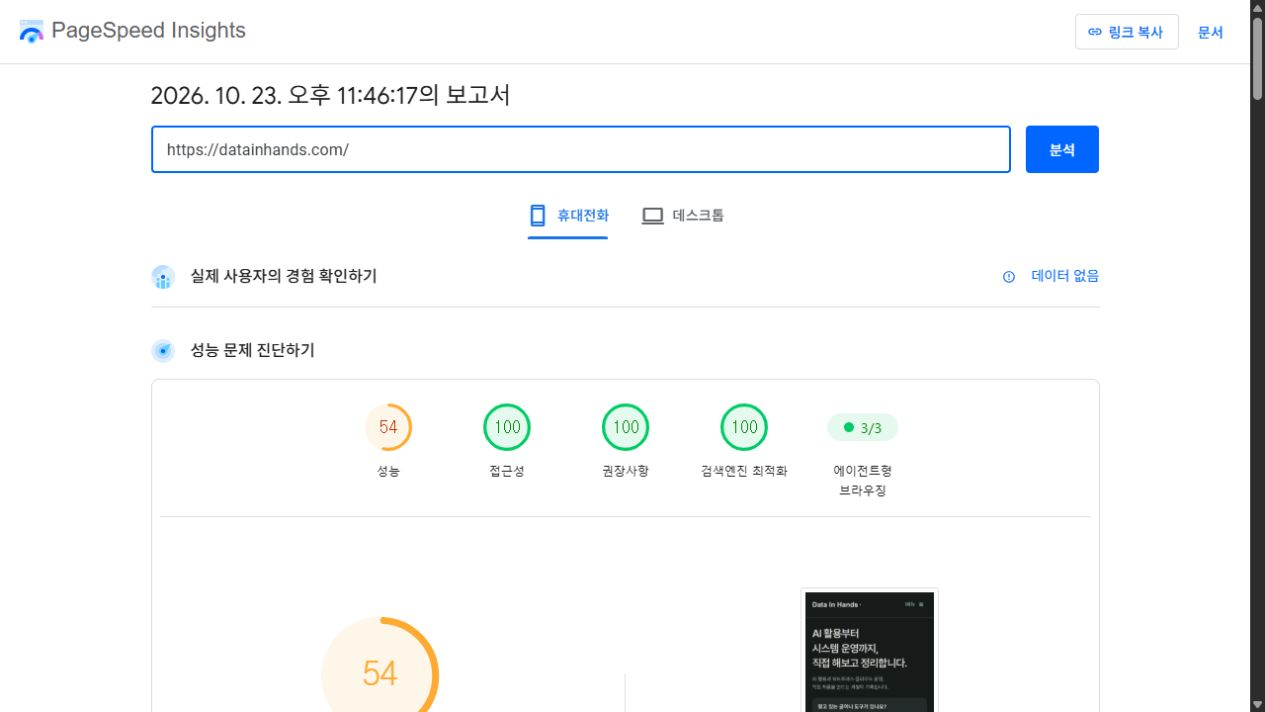
The mobile PageSpeed report from October 23, 2026 showed a performance score of 54, FCP of 3.887 seconds, and LCP of 19.582 seconds. The LCP element was the homepage headline, not the featured image.
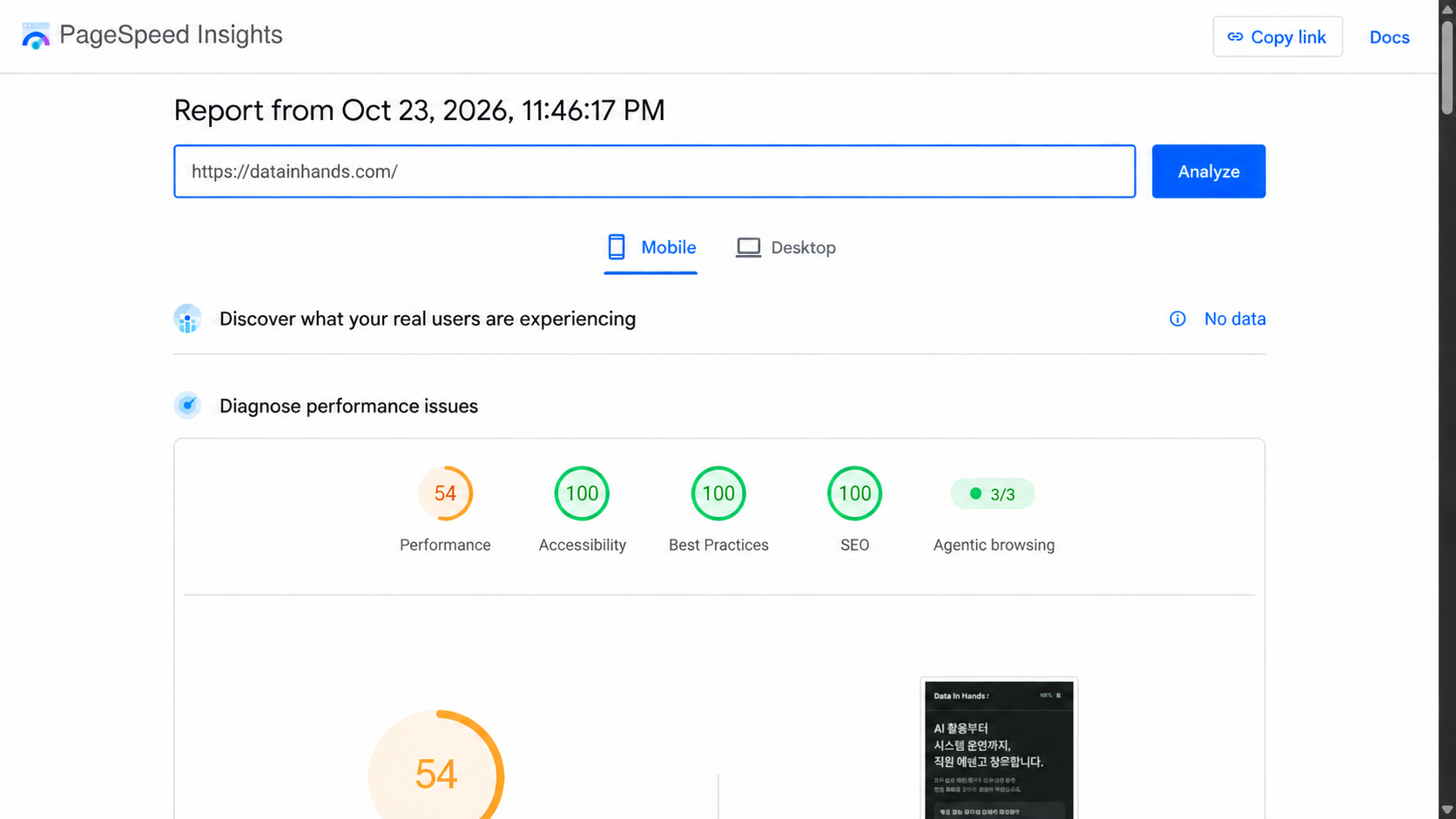
The new homepage WOFF2 was present in that run, along with old subsets such as PretendardVariable.25.woff2 and PretendardVariable.16.woff2.
I first checked whether the server and CDN were serving different font files. The new WOFF2 files matched by hash, and their response headers, cache settings, and CORS responses were normal. The evidence did not point to a missing or corrupted new bundle. Inspecting the public HTML then exposed the remaining preload tags.
Remove only the obsolete preload hints
The tags had this form. The path below is shortened for clarity:
<link rel="preload"
      href="/fonts/PretendardVariable.25.woff2"
      as="font"
      type="font/woff2"
      crossorigin="anonymous">
Adding the new homepage bundle did not remove those instructions. The optimized public HTML still contained 24 old font preload tags, and the PageSpeed download record showed old subset files being fetched.
FlyingPress reuses analysis results. The installed code grouped results using an HTML hash that excluded whitespace. It was possible that a change in inline font CSS had left an earlier font-hint set in use, but I did not establish the exact path that produced the hints. What I confirmed was their presence in the final HTML and the extra downloads.
The fix was limited to the two homepages and only ran when the new bundle was present. It removed preload hints for the old Pretendard subsets served from the site or its CDN. The subset files and CSS stayed available, so new characters could still trigger a normal font request. Regression checks preserved other pages’ preloads, unrelated external resources, and the new font hints.
The first response after replacing the code still contained the old tags. The server’s PHP code cache checked for file changes every 60 seconds. After that interval, I regenerated the homepage caches and verified that the old preload count had dropped from 24 to zero in both the generated HTML and the public cache-HIT response. Checking the source file alone would have missed that delay.
Compare the reports after the public cache has updated
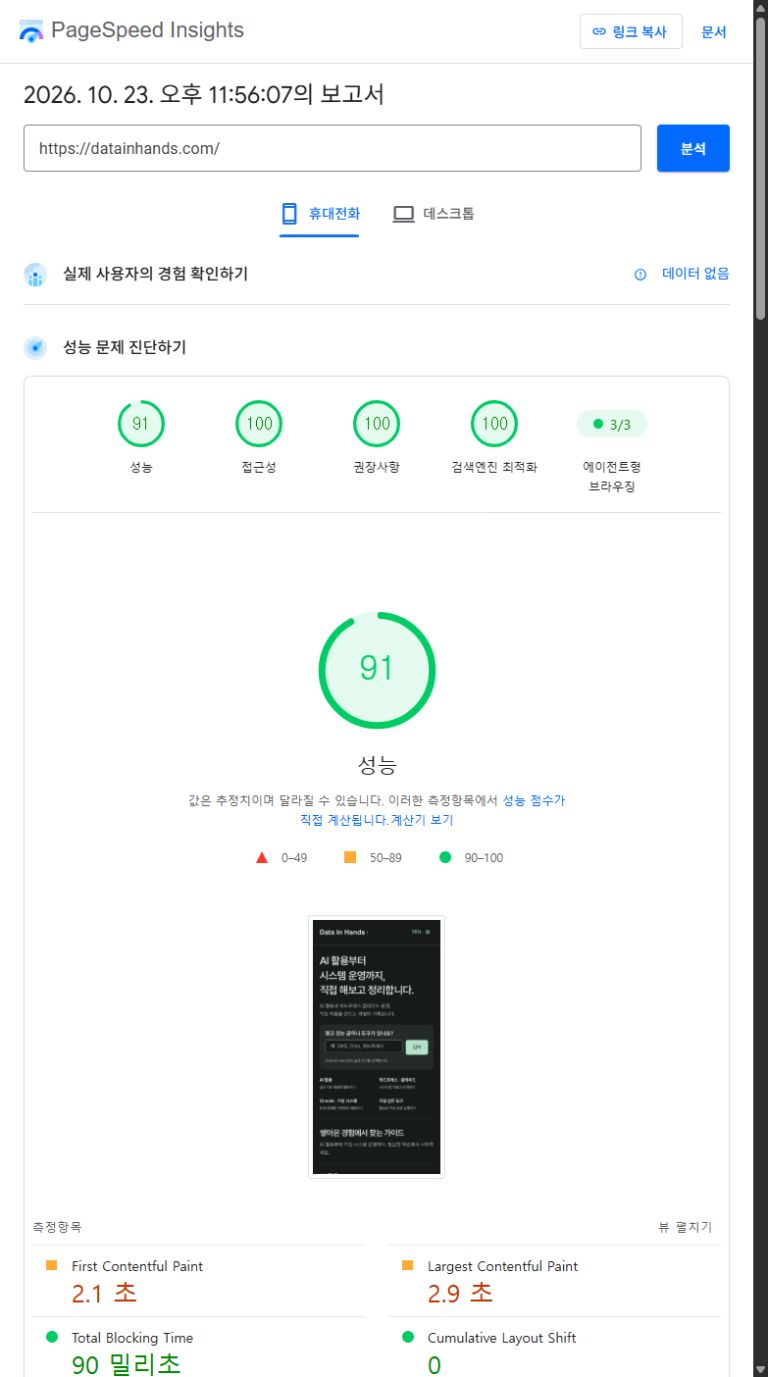
Once the public HTML no longer contained the duplicate hints, I ran PageSpeed again. The Korean homepage’s mobile score was 91, with an LCP of 2.853 seconds.
| Mobile metric | Before removal | After removal |
|---|---|---|
| Performance score | 54 | 91 |
| FCP | 3.887 s | 2.102 s |
| LCP | 19.582 s | 2.853 s |
| TBT | 231 ms | 93 ms |
| CLS | 0 | 0 |
| Speed Index | 10.162 s | 4.126 s |
FCP measures the first content appearing; LCP measures the largest content appearing. TBT is total blocking time, CLS measures layout shifts, and Speed Index describes how quickly visible content fills the screen.
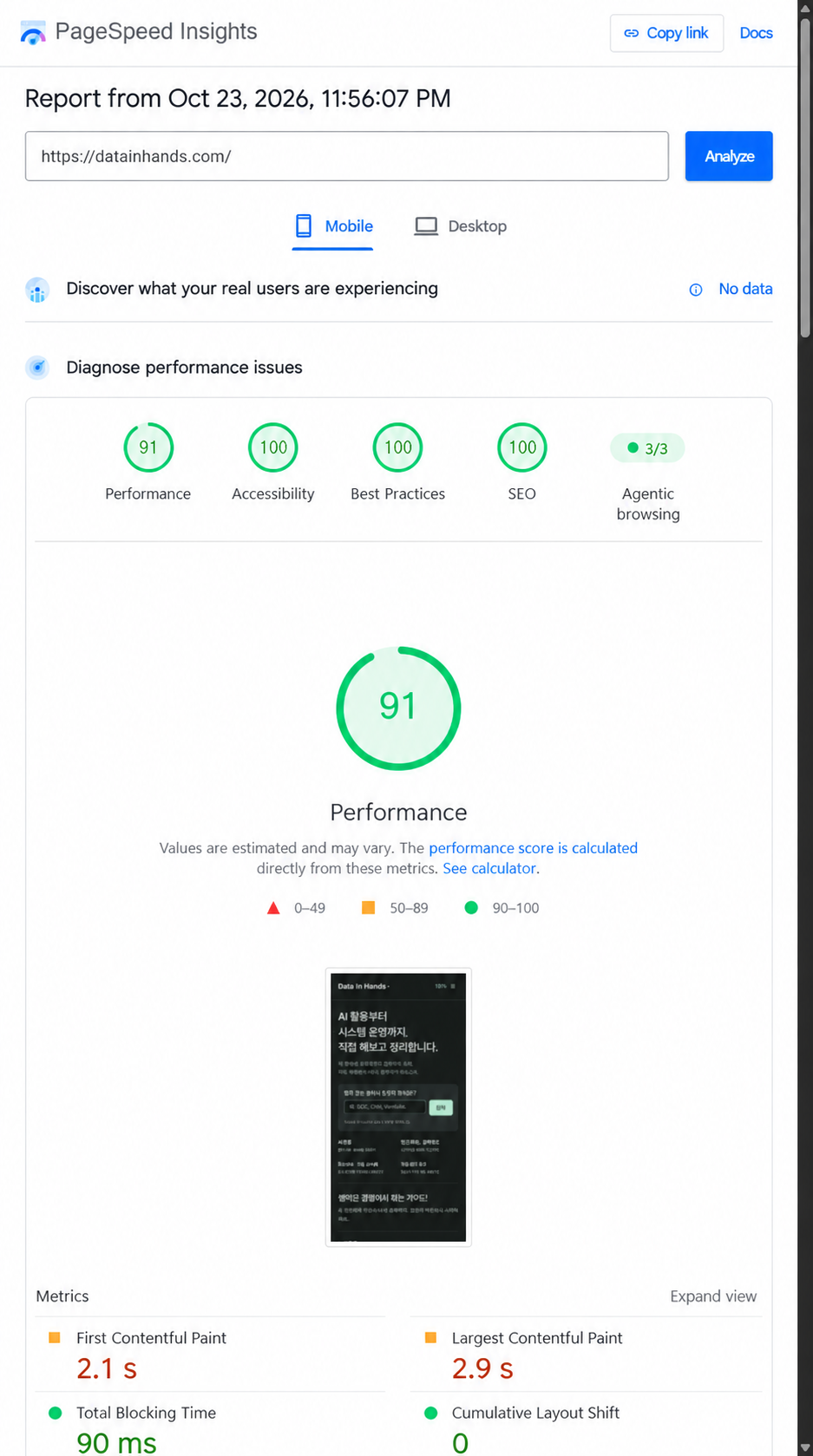
An intermediate run returned 56, with LCP at 14.912 seconds, before the cache had fully been replaced. I recorded it separately rather than treating it as the completed fix. The desktop report for the final state scored 86, with LCP at 0.766 seconds and TBT at 306 ms. JavaScript work remained a cost; unused JavaScript and render-blocking CSS were candidates for a later investigation.
Inspect the final HTML as well as the new file
My initial checks established that the new bundle loaded and that the page looked right. I treated that as evidence that the whole font-loading path was correct. The public HTML later tested by PageSpeed still contained instructions to fetch additional files.
A cache HIT and an HTTP 200 from the optimization API answered useful questions, but neither proved that the output was free of duplicate requests. I should have checked the browser’s complete font request list alongside the HTML served to a logged-out visitor.
I also should have kept the local throttled test, the production browser check, and PageSpeed’s mobile simulation clearly separated when reporting the result. A smaller file-size total from one test cannot establish an overall production speed improvement under different conditions.
Treat 54 to 91 as a measured comparison, not a guarantee
The two reports show better scores and LCP after the fix, and the HTML confirms that the obsolete preload hints were removed. Each state was measured by a single PageSpeed run. Ads, analytics, server and CDN cache state, and network or runtime variation could also have affected the difference.
There was no matching PageSpeed baseline from before the original font optimization deployment. I therefore cannot calculate how many points the font change itself cost or claim that the final page was necessarily faster than that earlier state.
The reports had no CrUX field data. A lab score of 91 does not establish a field Core Web Vitals pass. Chrome’s Lighthouse scoring guide explains why results vary.
Actual ad placement and overlap still need checking, as does hands-on testing on a phone. Loading an ad script did not complete those visual checks. The production fix and its verification records were merged into the main branch; the next performance investigation should still begin with the HTML visitors receive and the requests their browsers make.
Sources and related guides
- Before: mobile PageSpeed report, score 54
- After: mobile PageSpeed report, score 91
- FlyingPress cloud preload access requirements
- Initial font deployment, PR #12 and duplicate preload fix, PR #14 (repository access may be required)
- Self-hosting Pretendard for a Korean–English WordPress site
- Find the bottleneck before adding a CDN
- WordPress and cloud guides
Cover photo: Matthew Fournier on Unsplash, used under the Unsplash License. It illustrates development work; the screenshots in the article document the measurements.