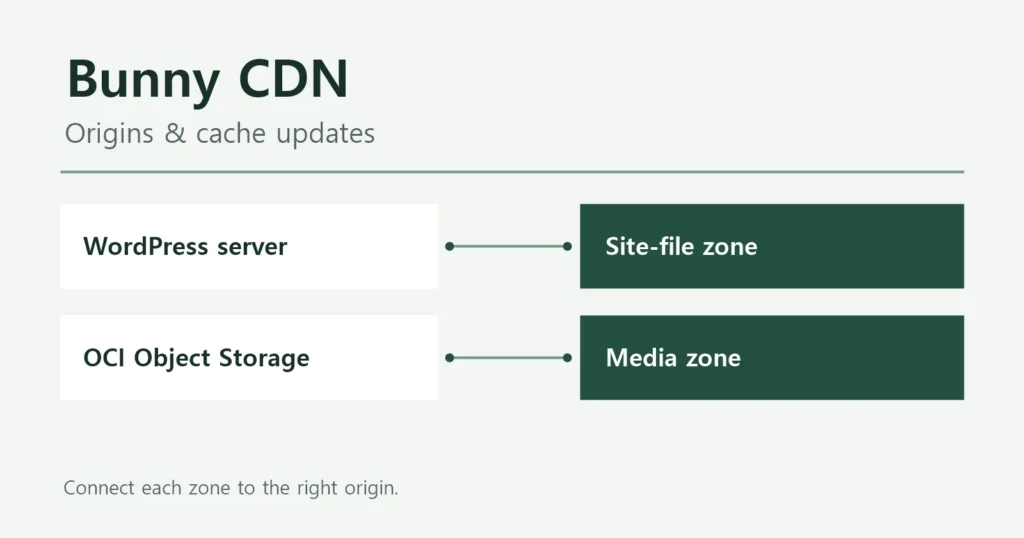
Data In Hands uses separate routes for page HTML and supporting files. The origin server supplies the HTML. Bunny CDN delivers most of the CSS, JavaScript, images, and fonts. Media stored separately comes from OCI Object Storage through a different Bunny route.
When a page loads slowly or an updated image does not appear, start with the affected request’s URL. HTML and supporting files come from different services. This guide follows the routes used by Data In Hands and explains which cache to check at each step.
The request paths below are based on checks from October 24, 2026. The WAAS settings were also reviewed on November 9. These are observations from those dates. Check your own responses even if you use the same configuration.
Why save HTML when the original post is already on the server?
A stored WordPress post is not the same thing as a finished web page. Its title and body usually live in a database. When WordPress builds a page, it retrieves the content from the database. The theme and plugins assemble the HTML, including the menus and body. The browser receives that HTML and displays the page.
Without a usable cache, WordPress has to build the HTML while handling the request. Visits to the same post can repeat that work.
Why is a cached file faster if it is on the same server?
Reusing finished HTML reduces the work needed before sending a response. FlyingPress’s page cache saves that HTML as a file for reuse.
This explanation applies to public pages that show the same content to different visitors. Pages with account-specific or personalized content need separate checks before their HTML can be shared through a cache.
| Work before delivery | No HTML cache | Usable HTML cache |
|---|---|---|
| Retrieve content and settings | Required | Much of it can be skipped |
| Build page HTML | Required | Reuse saved HTML |
| Send HTML | Newly built page | Saved file |
Reusing finished HTML reduces the work required before delivery. Some processing remains, depending on how the cache is served. If the server already responds quickly, the noticeable improvement may be small. Compare response times before and after enabling caching to judge the benefit.
Once the HTML response is fast, check how long supporting files take to load. The browser still has to load and process images, CSS, and JavaScript. Large images or heavy scripts can delay the page even when the HTML is cached.
Separate the page from the files it loads
A browser first requests an HTML document. It then finds the addresses of the CSS, JavaScript (JS), images, and fonts needed to display the page. Those requests can go to different services even though the reader sees one page.
The origin server is where WordPress and the original site files live. A content delivery network (CDN) serves copies of files from distributed locations. Bunny provides that service for this site.
| Content | Address used by the browser | First service reached |
|---|---|---|
| Page HTML | datainhands.com | OCI WAAS |
| Public static files | cdn.datainhands.com | Bunny CDN |
| Offloaded media | datainhandsoci.b-cdn.net | Bunny CDN |
For example, cdn.datainhands.com is the hostname used for files delivered by Bunny CDN. Requests to that hostname go to Bunny.
HTML can come from the FlyingPress cache on the origin
OCI WAAS is the security service in front of the site that inspects and forwards requests. A request for a post travels through it to the origin server. In the recorded HTML responses, WAAS did not cache the page. The origin served HTML that FlyingPress had already prepared.
Serving a usable copy is a cache hit (HIT). When no usable copy is available, it is a cache miss (MISS). A hit can spare WordPress and the database from rebuilding the same HTML for each request.

FlyingPress stores its finished HTML cache on the origin under wp-content/cache/flying-press/. Its documentation says an uncached visit receives an unoptimized page while the URL is queued for optimization. That first response is not equivalent to the finished optimized cache. FlyingPress cache creation and storage
What does the FlyingPress cloud do, then?
The FlyingPress cloud analyzes the page. The WordPress server stores the optimized HTML. FlyingPress also optimizes how files load. Its cloud service opens pages in a browser for analysis. It identifies resources needed for the initial view and CSS that is not used.
Here is what happens during preparation and during a reader’s visit.

When saved HTML is usable, the origin serves it. The reader does not need to wait for another cloud analysis. FlyingPress cloud analysis
Why use Bunny CDN if HTML is already cached?
Page caching reduces page-building work. In this setup, Bunny CDN delivers supporting files. Measure file transfer times before deciding whether to add a CDN. Pay particular attention to delivery times when your main audience is far from the origin server.
After receiving the HTML, the browser needs the files that make up the page. It requests files addressed to cdn.datainhands.com from Bunny CDN. If Bunny has a usable cached copy, it responds without fetching the file from the origin.
On a miss, Bunny needs somewhere to fetch the original. That destination is its Origin URL. For this site’s file zone, the configured value was https://datainhands.com. An origin fetch therefore also passes through WAAS.

If WAAS can serve a cached copy, the fetch stops there. Otherwise, it continues to the origin server. WAAS caches requests that match its rules. The rule reviewed on November 9 covered extensions such as CSS, images, and fonts, with a one-day cache duration. Check the response headers to see whether a particular request used the cache. Oracle WAAS caching rules
Gray boxes are not reached. Green arrows show requests; blue arrows show responses returning to the browser.
Offloaded media has a different origin
Some media files are stored in OCI Object Storage rather than on the WordPress server. Moving media to separate storage is called media offloading. Bunny still delivers those files to visitors.
The address for this route is datainhandsoci.b-cdn.net. Bunny calls the configuration that groups an origin address and cache settings a Pull Zone. This media zone points to Object Storage. On a miss, Bunny fetches the file from Object Storage. This origin connection bypasses the site’s WAAS and WordPress server.

An image kept on the origin server and an image moved to Object Storage therefore follow different routes. Check the image’s request URL to identify which one applies.
Where are the copies stored?
| Location | What it holds |
|---|---|
| Visitor’s browser | File copies allowed by cache policy |
| Bunny edge locations | Copies of CDN-delivered files |
| WAAS edge locations | Responses covered by caching rules |
| Origin server disk | FlyingPress HTML cache and original files |
| Object Storage | Original offloaded media |
A browser with a usable local copy may not need an external request. The original media in Object Storage is different from a CDN copy. To refresh the CDN cache, purge the cached copy. Keep the original file in Object Storage. MDN HTTP caching guide
Check the request URL and the response together
Start with one request that is slow or serving old content. Identify the service handling that request before choosing which cache to refresh. In Chrome or Edge, open developer tools, select Network, and reload the page.
- Select the affected request. Look under Document for HTML, Img for images, or CSS for stylesheets.
- Find Request URL under Headers. Identify the site hostname, the static-file CDN hostname, or the media CDN hostname.
- Check the response headers and the content. Read the cache status in the response headers. Then check the response content for the updated text or image.
A previous HTML sample included x-flying-press-cache: HIT and x-flying-press-source: Web Server: the web server served the cache prepared by FlyingPress. The same response had the WAAS status x-cache-status: NOTCACHED. WAAS did not serve a stored page, but the origin did. The two values describe different layers.
For a Bunny URL, check Bunny’s CDN-Cache header separately. A CDN may store and forward headers originally added by the origin. If you see a HIT but the content is still old, check for a stale cached copy. Measure response times separately to assess any performance improvement.
A Network entry also does not necessarily mean a fresh download from a server. Check whether the browser served it from its own cache. The developer tools’ Disable cache option helps compare browser-cache behavior. It does not purge Bunny or WAAS.
What happens to the saved HTML when a post changes?
The saved copy needs updating too. If the database contains an edit but the server keeps sending old HTML, readers still see the old text. FlyingPress automatically refreshes related URLs, including the homepage and category pages, when posts change. After editing a post, check that the homepage and category listings show the change. Check custom listings too. If updates appear only after a manual purge, investigate why automatic refresh is missing.
Replacing an image at the same URL is a separate issue: Bunny, WAAS, or the browser may still hold a file copy. See Part 3: refreshing the right cache after an edit for the update sequence.
Use the route to narrow the next step
For an HTML problem, investigate page caching and the origin response. For a file problem, check that file’s CDN address and origin. For images served from Object Storage, check the media Pull Zone. Clearing the WordPress server’s cache does not refresh copies held in that zone.
Do not disable WAAS caching simply because Bunny is in use. The earlier checks found files still requested through the main hostname. They also recorded a WAAS HIT. Before changing its rules, identify the files affected. Compare response times to assess the impact.
When configuring an origin, follow the actual settings screens in Part 2: Bunny CDN origins and cache settings. It explains which Pull Zone to configure for each origin.
For the basics, see when to use a WordPress page cache. To start with measurement, see finding WordPress bottlenecks before adding a CDN.