
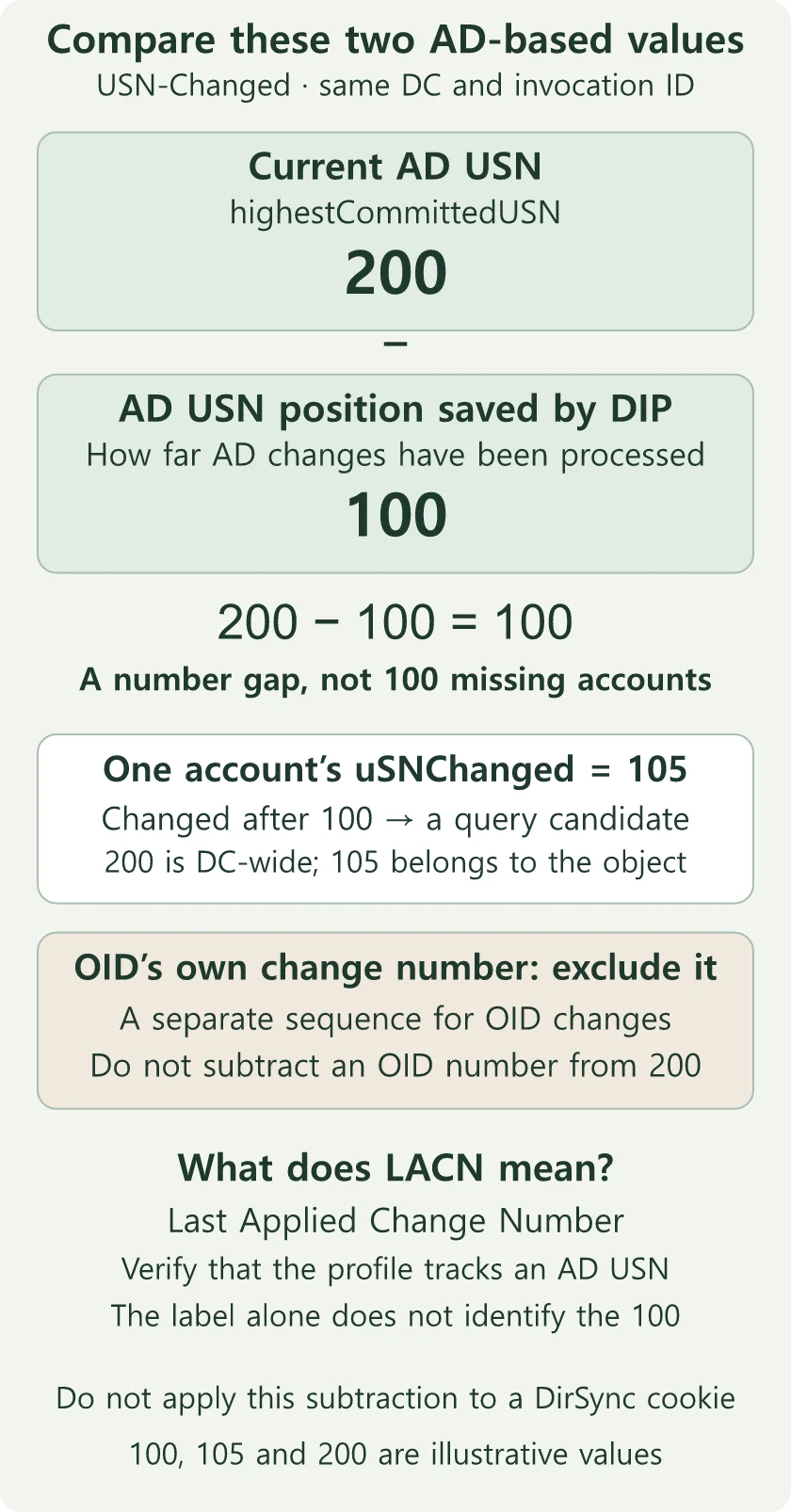
A large gap between the current AD USN and the AD USN processing position saved by DIP is not a count of missing accounts. First confirm that the DIP profile uses USN-Changed and that both numbers refer to the same DC and database instance (invocation ID). Check actual unapplied changes by comparing corresponding AD and OID account values. OID’s own change number is not part of this number comparison.
The original Oracle OID–Active Directory investigation involved a difference of several million sequence numbers, account mismatches, and a suspected synchronization gap spanning 2022–2025. It raised a practical question: what can the directory show now, and what requires retained historical evidence?
Identify what the checkpoint measures
Active Directory manages user accounts and groups. A domain controller (DC) is a server that provides that information. Oracle Internet Directory (OID) also stores directory entries, and Oracle Directory Integration Platform (DIP) transfers changes between the directories.
For example, when an employee’s email address changes in AD, DIP can read the change and update the corresponding OID account. A checkpoint records how far processing has reached, so the next run can determine where to continue.
LACN means Last Applied Change Number. A field with that label is not necessarily an AD USN. Check where the profile reads changes, which reader it uses, and which field stores its position. A profile is the configuration that defines what to synchronize and how.
Oracle DIP 12.2.1.4 documents both USN-Changed and DirSync readers. USN-Changed uses a change number to determine what to query next. DirSync sends back a cookie that the client returns on its next request to retrieve subsequent changes. This is an AD tracking value, not a website login cookie.
First check the reader configured in the DIP profile. For USN-Changed, identify the saved number and DC, then continue with the checks below. For DirSync, start with the profile’s processing logs and cookie-related errors rather than applying the USN-range query below. Treating a DirSync cookie as a USN, or subtracting an OID change number from an AD number, will not tell you how far synchronization has fallen behind. Oracle DIP change-tracking methods
Follow a changed value from AD to OID
A USN is a sequence number assigned when an AD server records a change. The USN-Changed reader uses it to find accounts changed since the saved processing position. If the saved position is 100 and Employee A has uSNChanged 105, that account may qualify for the query. DIP reads the account’s attributes and compares them with the existing OID values. If the email differs and is in scope, DIP writes the new value. An attribute is an individual field, such as email or phone number; a mapping defines which AD field corresponds to which OID field.
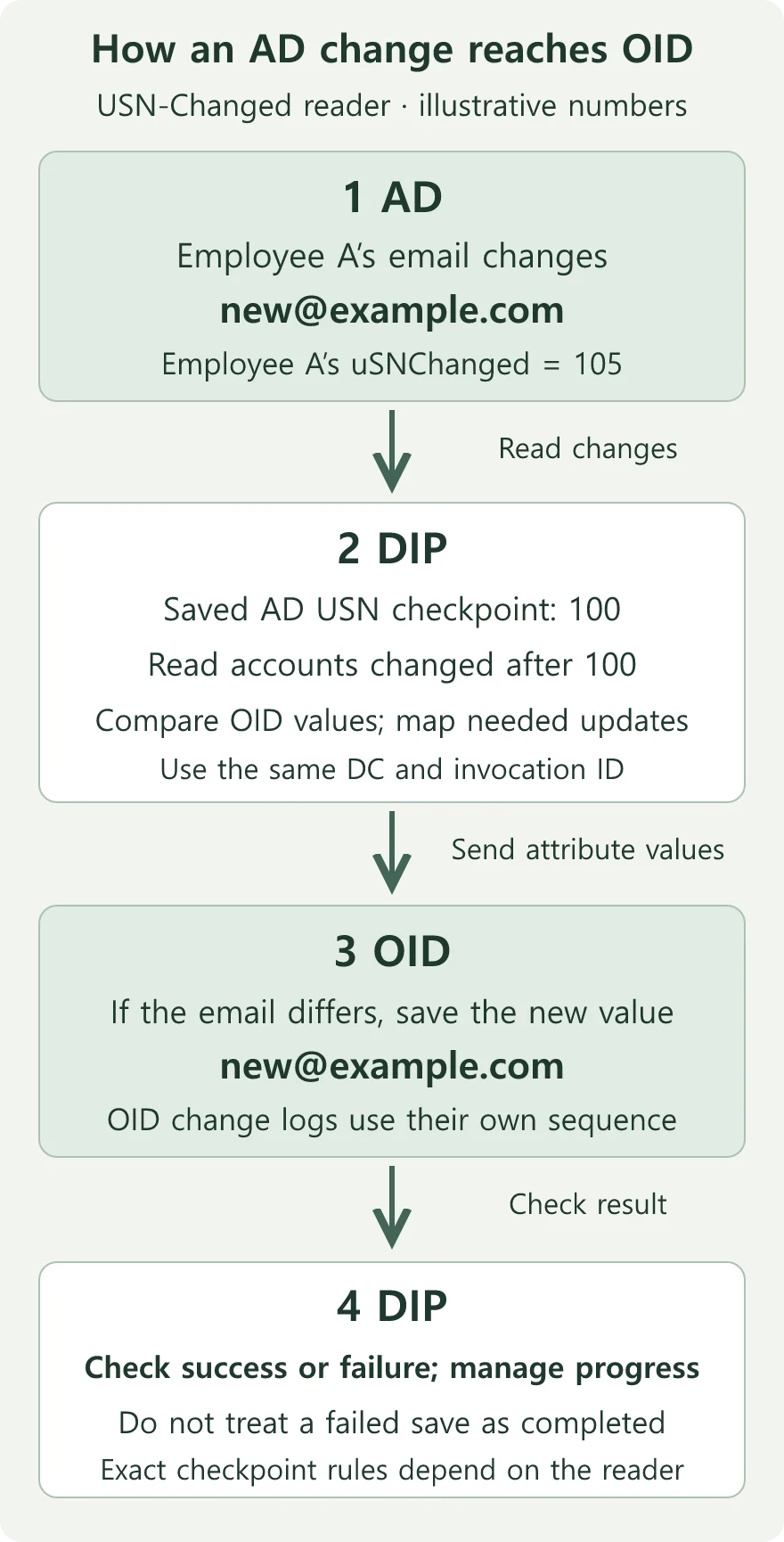
If the email changed several times before the query, DIP can read the latest value rather than replaying every edit. If OID already has that value, the email does not need another update.
The final step shows the processing principle. Check the installed DIP version and profile reader for the exact checkpoint update rules. This example is not an instruction to set the checkpoint to 105.
Do not turn a USN difference into a missing-account count
A DC assigns USNs as it records changes. An object’s uSNChanged holds its latest local change number. Each DC assigns its own numbers. Two DCs can hold the same account information and still report different USNs. If your results came from different DCs, repeat the comparison against one DC. Different numbers alone do not prove that the account data differs. Microsoft USNChanged guidance
One account may change repeatedly, and objects outside the synchronization scope can change too. Suppose DIP’s saved AD USN position is 100 and highestCommittedUSN on that same DC is 200. The intervening changes might include repeated edits to one employee’s phone number and updates to a group that is not synchronized. A difference of 100 does not mean 100 accounts are missing.
| Value | What it tells you |
|---|---|
highestCommittedUSN |
A current change-number reference on the queried DC, not the backlog for an OU. |
| AD USN position saved by DIP | The resume reference for the USN-Changed reader, not OID’s own change number. Verify the profile, DC and invocation ID. |
uSNCreated / uSNChanged |
Local creation and latest-change numbers, not a sequence of every intermediate update. |
whenCreated / whenChanged |
Time clues. whenChanged is local to the DC; distinguish it from an attribute’s originating change time. |
| Replication metadata | Attribute version, local and originating USNs, originating DC, and time; not a complete audit trail. |
An OU, or organizational unit, groups directory objects for administration. If you are investigating an OU containing employee accounts, the DC-wide change number also includes changes outside that OU.
whenChanged is also nonreplicated. An account’s creation time and USN cannot establish a date boundary for the whole directory. For example, knowing that an account was created on July 8 does not let you classify every lower USN as a missing account from before that date. To find when processing stopped, you need historical processing logs or saved checkpoints. whenChanged definition
The sections above explain the numbers and data flow. The checks below require AD read access and management tools. If you cannot run them, give the AD/OID administrators the affected account and differing fields, and ask them for these results.
Record the DC and observation context
These read-only examples require a Windows management environment with the ActiveDirectory module and repadmin installed. Use approved read access and replace the example names and DNs. A distinguished name (DN) is an object’s address within the directory. For example, CN=Sample User,OU=Users,DC=example,DC=com identifies Sample User in the Users OU of example.com. These commands were not run against production for this review. If your management computer lacks the module or repadmin, ask the AD administrator to provide these query results.
Import-Module ActiveDirectory
$dc = 'dc01.example.com'
$observedAt = Get-Date -Format o
$root = Get-ADRootDSE -Server $dc
$observedAt
$root | Select-Object dnsHostName, defaultNamingContext,
    highestCommittedUSN, dsServiceName
repadmin /showrepl $dc
RootDSE describes the connected directory server. Record its DNS name, the observation time, and the search base. Also retain the DSA invocationID shown near the top of repadmin /showrepl. It identifies the DC’s database instance. A restore can change the database instance without changing the hostname. Record both identifiers. If the invocation ID differs from the saved value, review the restore or change history with the AD team before reusing the checkpoint. Get-ADRootDSE · Microsoft change-tracking example
The output of repadmin /showrepl also reports replication between DCs. If it shows errors, ask the AD team whether the queried DC has the expected data before attributing the mismatch to DIP. Application synchronization delay alone is not a USN rollback. Rollback is a separate replication problem involving scenarios such as an improperly restored DC reusing USNs; Microsoft describes event 2095 among its indicators. USN rollback troubleshooting
Start with one mismatched account
Compare the current AD attributes, the corresponding OID values, and the DIP processing log for one affected account. Retain its AD objectGUID because a move or rename can change its DN. The objectGUID remains with the same AD object through a move or rename. Check which profile mapping links that object to its OID counterpart.
For example, if AD has an employee’s new email address but OID still has the old one, compare that attribute and the account’s DIP log entries. If DIP logged a processing error, resolve it before choosing a retry procedure. If the configuration excludes the email attribute, first confirm with the owner whether that attribute should be synchronized. The commands below inspect change numbers and times; query the affected business attribute, such as the email address, separately.
$objectDn = 'CN=Sample User,OU=Users,DC=example,DC=com'
Get-ADObject -Server $dc -Identity $objectDn -Properties `
    uSNCreated,uSNChanged,whenCreated,whenChanged |
    Select-Object ObjectGUID,DistinguishedName,
        uSNCreated,uSNChanged,whenCreated,whenChanged
repadmin /showobjmeta $dc $objectDn
In repadmin /showobjmeta, Loc.USN belongs to the DC being queried; Org.USN belongs to the DC where the change originated. Do not subtract these columns to calculate synchronization delay. To investigate timing, find the affected attribute’s originating DC and change time, then compare that time with the DIP logs.
The original sample showed version 1 and USN 32825 for objectClass, and version 4 and USN 36882 for userPrincipalName. Its timestamps were 2025-07-08 04:55:09 and 19:55:39. The sample’s time zone is unknown, so establish it before correlating other logs. repadmin metadata fields
If a group has several members, its overall change time cannot tell you which person was added or removed. Inspect the metadata for individual membership values as well. Get-ADReplicationAttributeMetadata -ShowAllLinkedValues provides that view. For a missing member, start with that member’s linked-value metadata. To establish who added or removed the member, you need historical audit logs; versions and last-change times do not provide the complete history. Attribute and linked-value metadata
Find changed objects, then check whether their changes are missing
This example uses the earlier $dc and a verified USN checkpoint from that DC and invocation ID. Restrict the search base before running it. Use the verified checkpoint, not an arbitrary number. Permissions and search filters affect the results, so an empty list alone does not establish that every change was applied.
$searchBase = 'OU=Users,DC=example,DC=com'
[long]$lastUsn = Read-Host 'Verified USN checkpoint for this DC and invocation ID'
$ldapFilter = '(uSNChanged>=' + ($lastUsn + 1) + ')'
Get-ADObject -Server $dc -SearchBase $searchBase -SearchScope Subtree `
    -LDAPFilter $ldapFilter -ResultPageSize 256 `
    -Properties uSNChanged,whenChanged |
    Select-Object ObjectGUID,DistinguishedName,uSNChanged,whenChanged
The page size of 256 controls how many results are requested at a time, not the total number of matches. If the query reports errors or limits, check whether it completed before relying on the list.
This search finds accounts changed in AD. It does not check whether those changes reached OID.
Suppose an employee’s email address changed in AD. If that account appears, check its email address in OID too. The new address means that email change is present. The old address means you should inspect the account’s DIP processing log. Get-ADObject search options
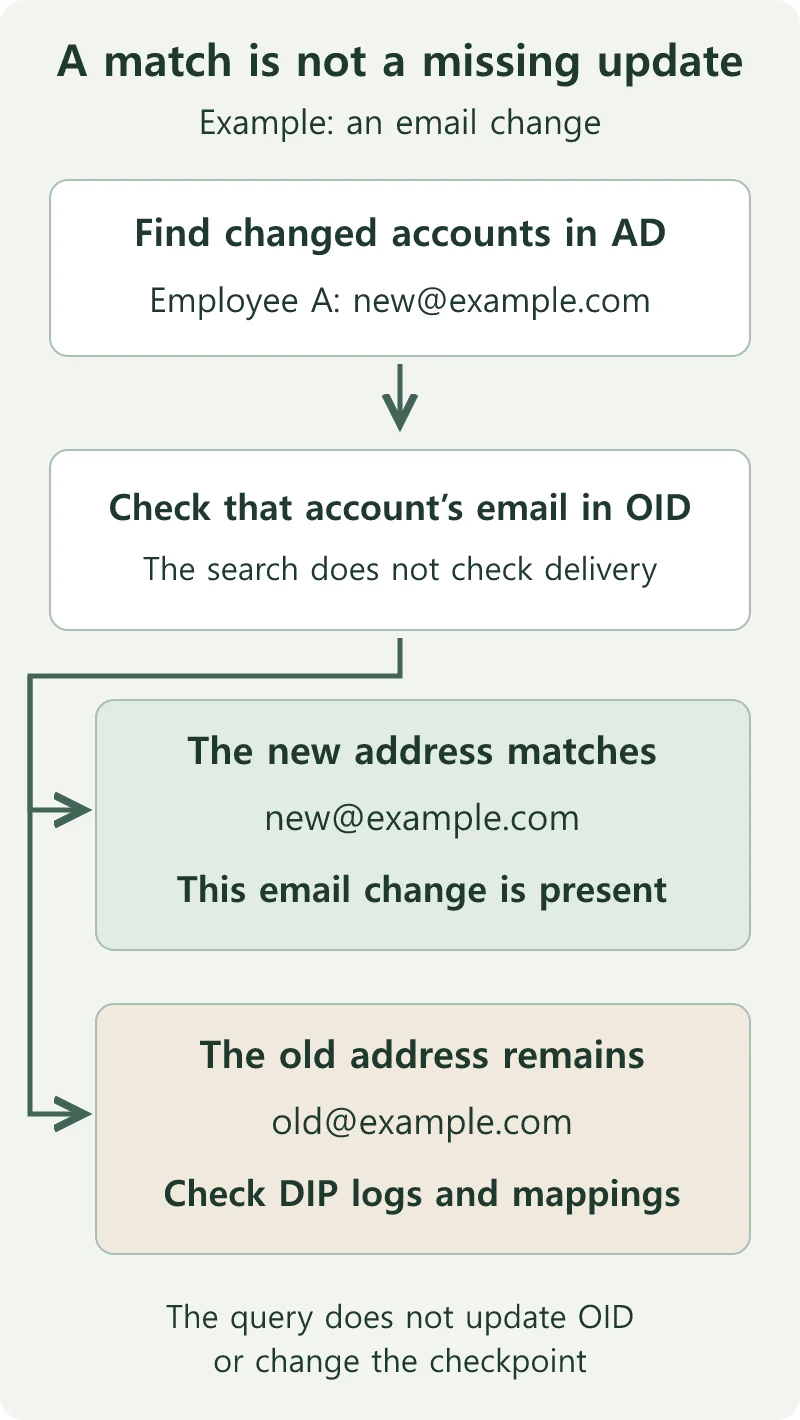
The commands only read information. They do not update OID accounts or the DIP checkpoint. Your task here is to compare AD and OID values and record the remaining differences.
Do not copy a result number into the DIP checkpoint. A change may have been read successfully but not saved in OID. Advancing the checkpoint at that point can cause the next run to skip the unapplied change.
If you are building a separate USN-based synchronization application, you also need a procedure for saving its position. Microsoft’s example reads highestCommittedUSN before the query and saves that number as the next query’s starting reference after updating the destination. This is implementation guidance, not an instruction to change DIP settings while running the diagnostic query. Change-tracking implementation example
Account for moves and deletions separately
For example, an account moved from Users to another department’s OU will no longer appear in a search limited to Users. Deleted accounts can also be absent from ordinary searches. Use the previously recorded objectGUID to check the object’s current location. If it exists in another OU, check whether the new OU is in the DIP synchronization scope. If you cannot find it, check deletion records and read permissions next.
If deletion records remain, an authorized operator can inspect them with tools such as Get-ADObject -IncludeDeletedObjects. Deleted Objects holds information about deleted entries. If the query returns nothing, first ask whether your account can read that container. Without that permission, the result cannot establish whether a deletion occurred. Deleted-object visibility
Retention depends on Recycle Bin configuration, tombstoneLifetime, and msDS-deletedObjectLifetime. These settings govern how long deletion information is retained. For an investigation spanning years, ask whether the historical records still exist. Today’s retention settings do not prove that older records remain available. Once records have been removed, a current AD query cannot recover them; compare historical backups, audit logs, and accounts remaining in OID. AD deletion retention
Use explicit transport and scope with ldapsearch
OpenLDAP’s ldapsearch can inspect a single object instead. You do not need to run this example as well if the Windows tools already provide the information you need. It uses POSIX shell line continuations, as on Linux, and requires a trusted LDAPS connection and approved read access.
ldapsearch -x -LLL -H ldaps://dc01.example.com:636 \
  -D "CN=Directory Reader,OU=Service Accounts,DC=example,DC=com" -W \
  -b "CN=Sample User,OU=Users,DC=example,DC=com" -s base \
  '(objectClass=*)' objectGUID whenCreated whenChanged uSNCreated uSNChanged
-H specifies the endpoint, -W prompts for the password, and -s base restricts the search to the named object. Enter the password when prompted. A certificate error means the connection needs attention before you can obtain results; correct the trust configuration rather than bypassing validation. If the connection succeeds but the account is absent, check the DN and read permissions first. Other implementations, including Oracle LDAP tools, may use different options. OpenLDAP ldapsearch manual
Establish the evidence before choosing a recovery method
- Record product versions, profile direction, filters, mappings, and checkpoint semantics.
- Match the DC, invocation ID, and time context, then identify the specific account and attribute differences.
- Check for objects missed because of moves, deletions, or access restrictions.
- Use the installed product’s procedures to assess incremental reprocessing versus a fresh initial synchronization, or Bootstrap.
- Before changing checkpoints or data, establish backups, overwrite and deletion impact, stop conditions, and a recovery plan; test the procedure outside production.
Incremental reprocessing revisits changes after a saved position. An initial synchronization matches the destination against the current source data. If old deletion records are gone, rewinding a number cannot recover every historical deletion.
Lowering a checkpoint changes where subsequent reading starts. It does not restore AD or OID to an earlier state. A smaller numerical gap is insufficient: verify account values, attributes, and deletion handling before calling recovery complete.
Case scope and documentation baseline
The original account ended while a recovery method was still being considered. There is no subsequent outcome evidence here. The several-million-number difference and the 2022–2025 period describe the investigation, not a verified missing-object count or an outage affecting every account for that entire period.
Reviewed November 5, 2026 against Microsoft documentation, the Windows Server 2025 ActiveDirectory cmdlet reference, Oracle DIP 12.2.1.4 documentation, and the OpenLDAP manual. The detailed repadmin reference is archived. The incident’s installed versions and patches are unknown; check local command help and product support before applying the examples.