
After an OCI migration, investigate server resources alongside configuration changes. Compare the traffic path (LB/WAF/OHS), authentication path (AD/LDAP), and DB/network path, then use timings from each stage to narrow the possible causes.
This guide outlines a sequence for investigating post-migration latency. Measure sign-in and dashboard loading separately, and collect the logs and configuration details needed for each stage. The checks also cover environments where backend bypass tests are not permitted.
- When: Since the migration? Or since a later change (auth/network/patch/config)?
- Who: Everyone / a specific user group (admins only, external users only) / a specific account type?
- Where: Sign-in step / dashboard load (query execution) step / both?
Sign-in and dashboard delays may share a cause or have separate causes. Record the time spent in each stage first. Those measurements help you decide which evidence to request from authentication, network, and database teams.
1) Pattern framing: the “three-sentence” scope reduction
A report that “sign-in is slow” does not define the scope. Before increasing log levels or restarting services, establish when the delay began, which users are affected, and where the time is spent.
- When: When did it become slow? (immediately after OCI migration vs after a later change)
- Who: Which users are affected? (all users vs a subset vs a specific account type)
- Where: Which phase is slow? (sign-in vs dashboard load vs both)
Once these are answered, the priority order becomes natural. For example, if “all users are slow at sign-in,” authentication/session initialization and the Front Door path move to the top. If sign-in is normal but a specific dashboard is slow, you should pivot to the query/DB track early.
| Item | On-Prem (before) | OCI (after) | Meaning (priority hint) |
|---|---|---|---|
| Sign-in time | e.g., 5–10s | e.g., 30s to minutes | Authentication / session init / Front Door (LB/WAF/OHS) rises |
| Dashboard load | e.g., seconds | e.g., tens of seconds to minutes | DB/query/network/connection pool/cache candidates are added |
| Blast radius | — | all users / some / specific dashboards | Distinguish “shared components” vs “specific resources” |
| Start time | — | right after OCI move | Migration config deltas (SSL/network/auth) are key clues |
- User-perceived: Use a stopwatch to measure “click Sign In → fully loaded UI” (repeat 3 times).
- Server-side: Preserve logs in the same time window (timestamps / ECID) to enable correlation.
Without numbers (seconds), you cannot objectively prove improvement after changing timeouts, cache, or provider settings.
2) Triage when backend bypass is not allowed
A bypass comparison can help isolate path effects when security policy permits it. Otherwise, correlate request timings and logs along the existing path. The inability to run a bypass test does not itself make LB/WAF/OHS a more likely cause.
Compare the same request and time window across these three paths:
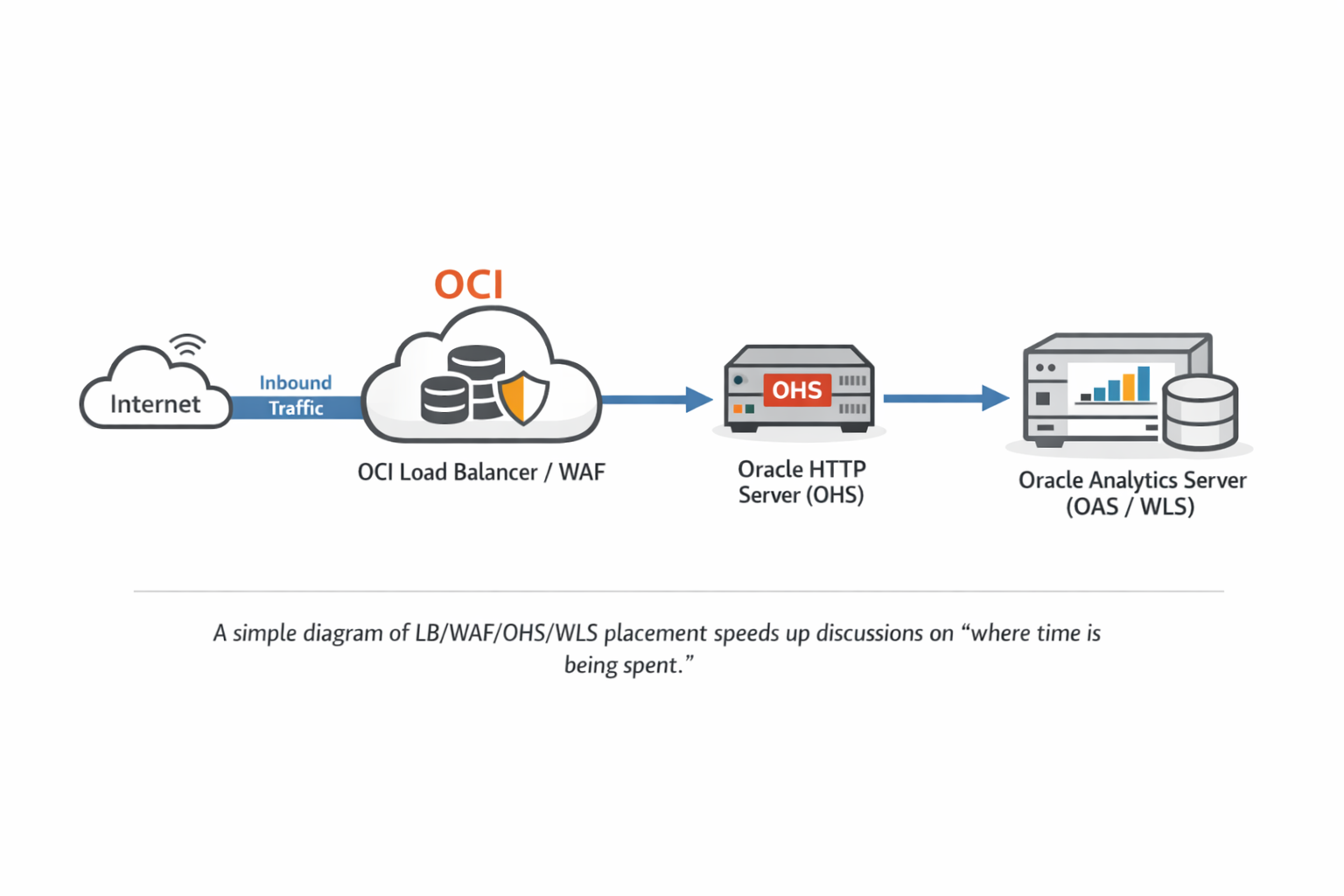
- Front Door axis: SSL termination point, timeouts, keep-alive, header forwarding, sticky sessions
- Authentication/Middleware axis: provider chain behavior, LDAP/AD connection and search latency
- Query/DB axis: isolate Physical SQL and validate with execution plans and DB-side waits
3) What to collect: preserve “evidence” with the smallest useful set
3-1. Pin the patch level (mandatory baseline)
Performance investigations often get derailed because multiple “similar-looking” issues overlap. Right after a migration, software level (patch bundle/PSU) and configuration (auth/network/proxy) often change at the same time. Your first step should be to capture the OPatch inventory to lock the baseline.
cd $ORACLE_HOME/OPatch
./opatch version
./opatch lsinventory -detail > /tmp/opatch_lsinventory_detail_$(hostname)_$(date +%F).txt
This output is not “just for reference.” It is your audit trail. If performance improves after you change timeouts or provider settings, you still need to separate “config effect” vs “patch effect.” Baseline data makes that possible.
3-2. Front Door (LB/WAF/OHS): commonly missed tuning points
One of the most common OCI migration deltas is where TLS is terminated. If TLS terminates at the LB, backend traffic might be HTTP. If you keep end-to-end TLS, OHS/WLS sees TLS directly. There is no universal “right” choice, but a change here often affects: connection reuse (keep-alive), idle/backend timeouts, and header processing—all of which can dominate perceived latency.
- Timeout alignment: Confirm how client/backend/idle timeouts are set and aligned across LB/WAF/OHS.
- Keep-Alive: If connections are recreated per request, both sign-in and dashboards can become noticeably slower.
- Sticky session: Check whether post-login requests are spread across nodes causing repeated session/auth work.
- Proxy headers: Validate Host and X-Forwarded-* behavior matches what OHS/WLS expects in your design.
When all users share the same symptoms, investigate common traffic, authentication, and DB/network components. For a particular user or dashboard, also examine the account and query involved. Prioritize checks using measured delays and change history, not whether bypass is permitted.
3-3. Authentication (AD/LDAP): confirm first, do not conclude from a single dump
If sign-in time grows significantly, you should check whether user/group lookups are delayed. However, seeing LDAP-related threads in a thread dump does not prove LDAP is the root cause. LDAP threads can be “normally waiting,” while the real bottleneck is elsewhere (Front Door, DB, internal cache).
- Confirm the Authentication Provider chain and which providers are actually invoked during OAS login.
- Identify whether the LDAP endpoints observed in dumps are intended (treat unexpected routing/referrals as “needs validation”).
- Verify timeouts: not only connect timeout, but whether LDAP search/read/response timeouts exist and how they are configured.
- Review Follow Referrals: enable only when required; confirm whether it expands to additional endpoints.
If LDAP threads repeatedly show the stack pattern below, they may be waiting on network responses. Note that Java thread state may appear RUNNABLE even while the thread is effectively blocked in a native socket read (e.g., socketRead0). The critical proof is whether this wait blocks the request-handling (business) threads serving your login.
- java.net.SocketInputStream.socketRead0
- java.io.BufferedInputStream.read / fill
- netscape.ldap.ber.stream.BERElement.getElement
- netscape.ldap.LDAPConnThread.run
Capture the ExecuteThread (or request thread) handling the login in the same time window. Check whether the LDAP wait corresponds to the actual sign-in delay, then share the relevant traces with the network, AD, and LDAP teams.
PID=<bi_server1_pid>
jcmd $PID Thread.print > /tmp/bi_server1_td_1.txt
sleep 10
jcmd $PID Thread.print > /tmp/bi_server1_td_2.txt
sleep 10
jcmd $PID Thread.print > /tmp/bi_server1_td_3.txt
4) Slow dashboards: when to pivot to the Query/DB track
If sign-in is normal but a dashboard is slow, first check Physical SQL execution time and DB waits. If they do not account for the delay, investigate result delivery, networking, server processing, and browser rendering. Do not assume the cause is the same as the sign-in issue.
Practically, the flow is:
- Reproduce the slowness and identify which queries run during the slow window.
- Validate the Physical SQL on the DB side: execution plan, waits, index usage, and resource consumption.
- If it is slow only in OCI, compare DB placement, network path, and session/environment differences with On-Prem.
Fixing sign-in does not guarantee dashboards will be fast, and tuning one dashboard query does not automatically improve sign-in. Keep the two tracks separate, and prove each with its own evidence.
5) Wrap-up: a minimal checklist for higher-quality triage
- Baseline: capture OPatch inventory to lock patch/version baseline
- Split: sign-in vs dashboard; all users vs subset; confirm the exact scope
- Front Door: review timeouts / keep-alive / sticky sessions / header forwarding
- Authentication: provider chain + endpoint identification + connect/read/search timeout existence/values + referral behavior
- Query: for dashboard slowness, pivot to Physical SQL + DB execution plan