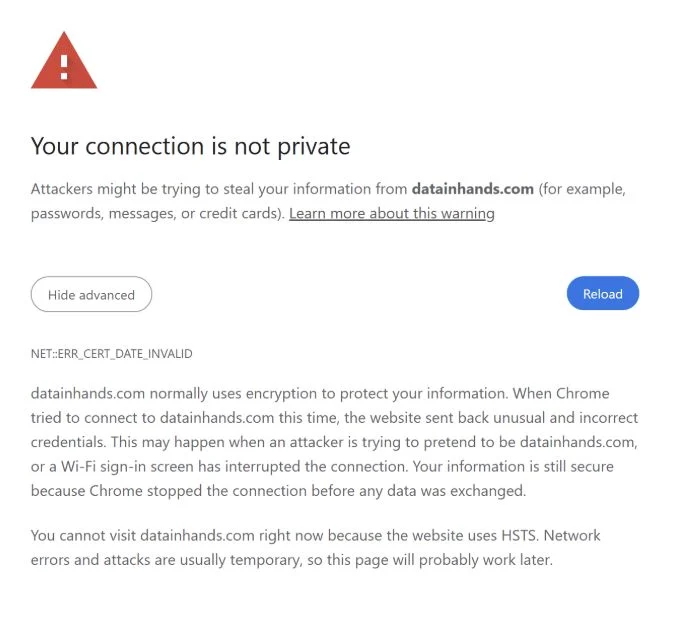
Opening the blog brought up a privacy warning instead of an article. The browser reported NET::ERR_CERT_DATE_INVALID. Automatic certificate renewal was already configured.
The self-hosted WordPress origin server already had its new certificate in place through automatic renewal. But deploying that certificate to OCI WAF had failed. WAF, which accepts visitors’ HTTPS connections, was still serving the old certificate. Once it expired, browsers blocked access.
The deployment log identified the missing key_file setting. We restored the existing OCI configuration and deployed the valid certificate to WAF. We then checked the certificate visitors actually received.
Recovery and the certificate visitors received
The existing authentication details were checked for a match before the server’s OCI configuration was restored. No new account or permissions were created. The valid certificate already on the origin was then deployed to WAF.
WAF deployment is asynchronous. Accepting the request does not finish the work. The OCI work request was checked until it reached SUCCEEDED. Public connections were then tested to confirm that the new certificate was being served.
- All three endpoints resolved during the check passed certificate trust validation.
- The Korean home, English home, a representative article, and the www redirect were checked three times each. All 12 requests returned HTTP 200, indicating a successful response. None had a TLS certificate error.
- The new certificate expires on January 18, 2027, at 14:11:57 KST.
- The existing renewal service was run again. It verified that the certificates already matched and exited successfully.
Certificate verification stayed enabled during these checks. The WAF policy was compared before and after deployment. Settings other than the certificate reference were preserved. Existing schedules and security rules were retained.
Old and new certificates were both observed while deployment was in progress. An initial manual check reached its 30-minute wait limit. The OCI operation was still running. Once deployment finished, repeated public requests confirmed the new certificate and successful responses. Those results confirmed recovery.
Where the site accepts HTTPS connections
Data In Hands is a WordPress site with Korean and English content. Its origin server runs in OCI. The origin serves the site’s content and files. Requests for article pages pass through OCI WAF before reaching that server.
A web application firewall inspects incoming web requests. In this deployment, WAF also accepts visitors’ HTTPS connections. The browser therefore checks the certificate installed on WAF. This article covers an OCI deployment managed through a WAAS policy.
| Component | Role on this site |
|---|---|
| WordPress origin | Serves content and site files. Earlier server inspections verified Apache configuration. |
| FlyingPress | Serves cached HTML pages. Also rewrites eligible static asset URLs to use the CDN. |
| OCI WAF / WAAS | Receives requests for the main domain. Has its own deployed certificate for visitors. |
| Bunny CDN | Fetches site assets for delivery to visitors. Uses a separate origin path for media moved to external storage. |
| OCI Object Storage | Stores the original media files moved out of WordPress. Moving their storage location is called offloading. |
| Certbot and a deployment hook | Renew the certificate on the origin and transfer it to WAF through a separate script. |
The table includes components verified in earlier configuration records and during recovery. The incident investigation did not collect a complete new hardware and software inventory. Unverified capacities and installed versions are omitted.
How requests reach pages and files
- Article pagesVisitor → OCI WAF → WordPress origin
- Site assetsVisitor → Bunny CDN → main domain / WAF → origin
- Offloaded mediaVisitor → media CDN → OCI Object Storage
The expired certificate was on WAF for the main domain. Article requests still had to pass that certificate check, even if media used another path. The records do not show whether every CDN asset was also unavailable.
Certificate deployment follows another sequence: Certbot renewal → WAF upload and activation → public HTTPS verification. After renewal on the origin, the certificate still needs to be deployed to WAF.
What the logs showed
All times below are Korea Standard Time (KST, UTC+9). Certificate expiration and recovery verification are separate events.
| Time | Verified event |
|---|---|
| October 20, 2026 | A WAF deployment log recorded an upload failure caused by a missing key_file setting in the OCI configuration. |
| November 19, 14:26:09 | The certificate served by WAF expired. Its expiration timestamp matched the browser’s date-related error. |
| During recovery | The origin already held a certificate valid until January 18, 2027. The existing renewal timer was running. |
| November 19, 16:03 | Repeated public TLS and page-response checks were completed after recovery. |
| November 19, 16:43 | All 15 production OCI alarms added during the work were in an OK state. |
| November 19, 17:31 | Better Stack showed successful site checks. The collector also sent its completion heartbeat. |
16:03 is the verification completion time. It is not the exact moment service recovered for every visitor. Continuous measurements across all visitor paths were unavailable, so these timestamps are not presented as a precise outage duration.
Why WAF missed the renewed certificate
The old certificate remained on WAF
The immediate cause was an expired certificate presented by WAF. A browser checks the HTTPS peer’s certificate before retrieving the article. The renewed certificate on the origin was not presented to visitors at that point.
The browser warning also said HSTS prevented access. HSTS tells the browser to use HTTPS. That protection remained enabled throughout recovery.
The upload failed because an authentication setting was missing
The October 20 log identified a missing OCI key_file setting. This setting points to the private key used to sign OCI API requests. It serves a different purpose from the website certificate presented to visitors. Without the required configuration, the deployment script could not upload the renewed certificate to WAF.
The logs identify the missing setting as the cause of the upload failure. They do not establish who changed the configuration or when.
The next scheduled run still did not deploy the certificate to WAF
Certbot handles certificate renewal. On a later run, it may leave a still-valid certificate unchanged. Its deployment hook runs a separate task after a certificate is renewed. This site used that feature to upload the certificate to WAF.
Issuance had succeeded, but the upload had failed. The next scheduled run still did not deploy the certificate to WAF. A separate check was needed to confirm that WAF had received the certificate already issued.
The deployment check was also incomplete. Once OCI accepted the request, the process did not follow it through to completion. The process lacked a check that visitors were receiving the new certificate.
Deployment checks and independent monitoring
Check WAF deployment after every renewal run
After the existing renewal service runs, an additional step compares the origin and WAF certificates. This check runs even when no new certificate is issued. It can then repair a missed WAF update.
The deployment process waits for completion. It then checks that the public endpoint serves the expected certificate. A lock prevents overlapping executions. A concurrency check protects against applying an update over another policy change. The wait limit was increased based on how long deployment took during recovery.
Alert on connection failures and stopped monitoring
OCI now has alerts for external availability, certificate expiration, and renewal failures. It also watches a periodic signal from the monitoring program. This signal is called a heartbeat. A missing heartbeat can indicate that the monitoring program itself has stopped.
Testing found that an OCI Basic HTTPS check could report HTTP 200 for an expired-certificate target. A successful page response was therefore not treated as proof of certificate validity. Explicit certificate verification was enabled in OCI APM for the external TLS check.
Better Stack was added so connection failures could still be reported if OCI notifications failed. It checks both language home pages and www every three minutes. TLS verification is enabled for those checks. The collector runs checks on the origin server. It sends a completion heartbeat directly to Better Stack.
The Better Stack free account checked on November 19 did not include advance expiration alerts. OCI handles those warnings.
A completion heartbeat tells Better Stack that the collector finished its run. That signal alone does not establish that every OCI monitor is healthy.
Separate test targets reproduced certificate errors and interrupted heartbeats. The production certificate was not deliberately expired. Actual email receipt was confirmed for four OCI warning types and two Better Stack test alerts.

What the next renewal still needs to prove
Public HTTPS access was restored. The test warning emails also arrived.
The next scheduled renewal must be checked from certificate issuance through automatic deployment to WAF. The service rerun during recovery succeeded with certificates that already matched. It did not test a complete new renewal cycle.
For a similar deployment, first identify which component presents the certificate to visitors. Compare its expiration date with the origin certificate. If they differ, inspect the deployment logs after checking the renewal logs. Once they match, verify the result through a public HTTPS connection.