
Table of Contents
ToggleIntroduction
Review OID request growth alongside the capacity of each participating component. Part 1 covers capacity decisions, the main observations to collect and the distinction between application, LDAP and database processing.
Navigation:
- You are here: Part 1 – Fundamentals & Core Architecture
- Next: Part 2 – Implementation Strategies & Real-world Applications (Korean)
Understanding Oracle Internet Directory Scaling
Optimization improves the use of existing resources; scaling adds capacity for increased demand. In practice, review bottlenecks and capacity together.
A growing user population can increase authentication traffic, but capacity planning must use measured request volume and operation mix rather than account counts alone.
This article builds on previous optimization techniques to outline the observations needed before choosing a capacity change.
Key Concepts:
Distinguish capacity expansion from optimization.
- Scaling adds resources or changes the server topology to accommodate additional load.
- Optimization improves how existing resources are used through cache, connection-pool and search/index settings.
Decide whether to scale by comparing measured capacity with expected load.
- Track LDAP operation mix, request frequency and peak concurrency, not just user counts.
- Identify the limiting component before choosing a capacity change.
- Compare response times and errors under a comparable workload after the change.
Prerequisites for Scaling
Check the installed versions and operating conditions before making changes.
- Verify the exact OID, Oracle Database and OS versions and their supported combinations. “11g or higher” alone does not establish compatibility or support.
- Understand LDAP search/authentication behavior and the client connection model.
- Prepare database administration, backup/recovery procedures and a test environment.
Adding servers may leave delays unresolved when search behavior, connection leaks or database waits are the cause. Compare client, OID and database metrics to identify the stage that limits request processing.
The Four Pillars of Successful OID Scaling
1. Resource Utilization Analysis
Record CPU, memory, disk and network activity over the same interval as LDAP request load. Separate OID, client-application and database metrics to narrow the possible bottleneck.
- CPU: identify processes with sustained high use and compare changes in request load.
- Memory: inspect process use, available memory and swap activity over time.
- I/O: check whether disk or network latency rises alongside request latency.
Comparing resource metrics over the same interval helps distinguish workload changes from possible bottlenecks. Include request rate and response time in capacity decisions.
2. Growth Pattern Analysis
Track user counts, LDAP request volume and directory data growth.
- User growth: compare account counts with actual authentication and search traffic.
- Data growth: track entry counts, attribute sizes and changes in search patterns.
- Peak periods: measure concurrency during events such as business-day starts and batch jobs.
Use expected load and test results to plan capacity changes. Choose server, storage or load-balancing changes for the measured constraint and keep the before/after measurement conditions comparable.
3. Performance Metrics Framework
Define the metrics and observation interval before diagnosing performance.
- Response time: record latency and errors separately for searches, authentications and other operations.
- Throughput: compare completed operations with changes in offered load.
- Resource use: separate OID, client and database CPU, memory and I/O metrics.
- Connection pools: inspect use, limits, waiting time and possible leaks.
Latency or reduced throughput alone is not a reason to add capacity; compare the operation mix and investigate the constraint.
Select monitoring tools for the installed version and configuration.
- Oracle Enterprise Manager: verify the metrics available for the OID version and management plug-in.
- LDAP server logs: compare errors and processing delays with changes in request load.
Synthetic transactions in a test environment can compare representative searches and authentications over time. Record the duration and impact of anomalies and use those observations in the next capacity review.
4. Infrastructure Planning
Choose a scaling approach for the measured constraint.
- Vertical scaling: add resources after identifying CPU, memory or storage limits.
- Horizontal scaling: verify supported OID topology, data consistency and failover requirements before adding servers.
- Resource allocation: distinguish OID processes, client LDAP pools and database pools when tuning.
- Cache/search optimization: test search patterns, indexes and caching against the installed-version documentation.
None of these changes guarantees an improvement. Compare before and after with the same workload.
Some key considerations when planning your OID infrastructure include:
Include validation and recovery procedures in the plan.
- Capacity: account for peak demand and projected growth, documenting the basis for headroom.
- Availability: verify supported replication/failover configurations and plan a failover test.
- Alerts: define warning conditions and response procedures from measured operating requirements.
- Testing: compare latency, throughput and errors under a representative load and define rollback criteria.
OID Architecture Deep Dive
The following sections distinguish clients, applications, OID LDAP processing and the database for troubleshooting. These are discussion groups, not a claim that every deployment has the same four-layer request path.
OID System Core Components
The diagram below groups components for discussion; it is not a mandatory LDAP request path. LDAP clients connect to an OID LDAP listener, and OID server processes use Oracle Database. Applications hosted on WebLogic can act as LDAP clients, and some deployments use WebLogic-based management tools. Do not infer that every LDAP request passes through a WebLogic Work Manager. Verify the request and management paths separately for the installed version and configuration.

Client Layer: The Entry Point
Clients send LDAP bind, search and update requests to OID. Distinguish client behavior from server-side authentication and access-control decisions.
- Inspect client request rates, retries, timeouts and connection-pool use.
- Compare the time spent in OID authentication, search, update and access-control processing.
- When distributing requests across OID servers, test supported topology, connection persistence and failover behavior.
Application Layer (WebLogic)
WebLogic can host applications that use OID or tools that manage it. Distinguish those workloads from the OID processes that serve LDAP requests.
- Work Managers and execution threads govern WebLogic application work; they do not directly set OIDLDAPD LDAP-processing capacity.
- Compare application LDAP pool use, request rate and waiting time with OID latency over the same interval.
- Adding WebLogic cluster members does not automatically increase OID or backend database capacity.
Identify whether the constraint is in the application, OID or database before testing a change to that component.
LDAP Layer (Core Services)
OID server processes handle LDAP operations and access Oracle Database.
- Server processes: measure throughput and latency for search, add, modify and delete requests.
- Database connections: inspect OID pool limits, use and waiting time.
- Tuning: test process counts and connection settings using the installed-version guidance.
Do not treat custom partitioning of the OID storage schema as a general scaling method. Check support and schema-change restrictions first.
Database Layer (The Foundation)
Oracle Database stores the directory data, so include database observations when investigating OID delays.
- Storage: record data/index growth and available space.
- Performance: compare LDAP load with database waits and I/O over the same interval.
- Recovery: verify restoration procedures and test results, not only the existence of backups.
ASM, RAC and Data Guard are not universal performance fixes. Review supported version combinations, topology, licensing and operating requirements separately.
Component Interactions and Performance Impact
Compare load across clients, OID processes and the database. Examine management or application server metrics separately when those servers participate in the workload being investigated.
Higher application concurrency can increase OID and database load. Compare client waiting time, OID throughput and database metrics over the same interval to identify the constraint. Increasing WebLogic threads is not the same operation as adding OID server processes.
Increasing one component does not guarantee lower end-to-end latency. Test before and after the change with a comparable workload, including errors and response times.
Performance Metrics Framework
Compare the following metrics over the same observation interval.
- Latency and errors: record them by LDAP operation type.
- Throughput and concurrency: compare completed operations and waiting time as offered load changes.
- CPU, memory and I/O: examine processes and database activity during the delay.
- Connection pools: distinguish client LDAP pools from OID database pools and compare use with waiting time.
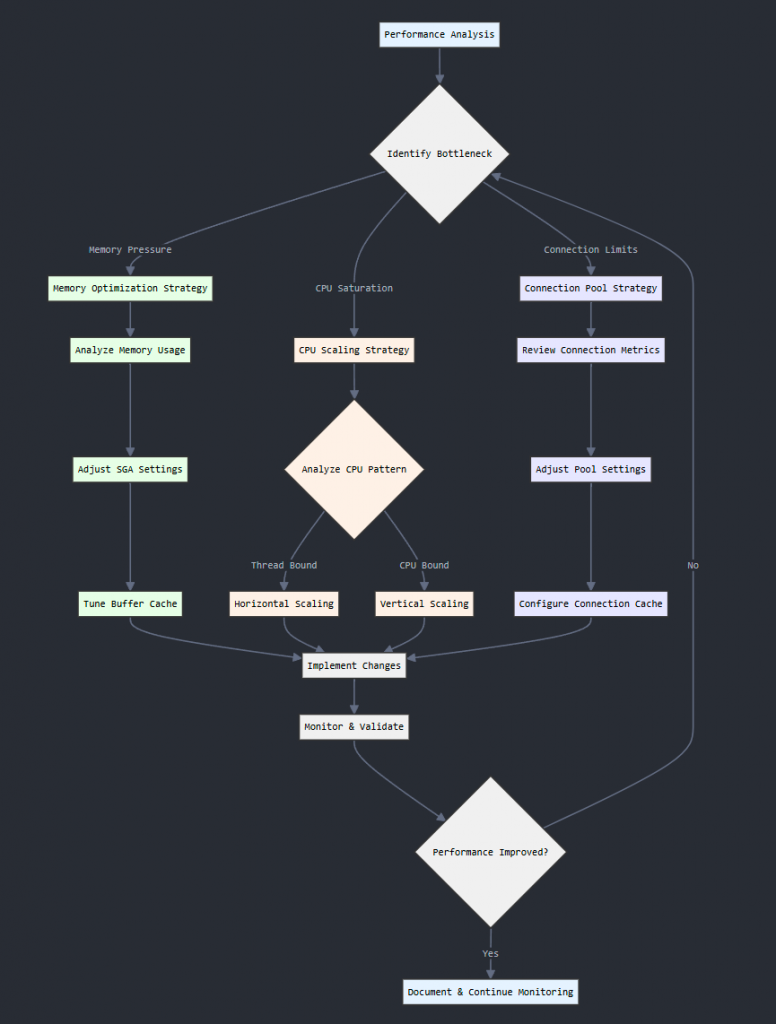
Use logs and the request mix to investigate changes in metrics.
- Oracle Enterprise Manager: verify management features and collected metrics for the installed version.
- LDAP logs: compare error and delay times with workload changes.
# Connection monitoring command (requires orclstatsflag=1)
ldapsearch -h <host> -p <port> -D cn=orcladmin -q \
  -b "cn=client connections,cn=monitor" -s base "(objectclass=*)"
Use synthetic transactions in a test environment to compare representative searches and authentications. Define the load and execution scope first; synthetic traffic does not guarantee the absence of user impact.
Key Performance Indicators
Compare memory, CPU and connection observations with request load and latency.
1. Memory Health Metrics
Observe available memory, process memory use and swap I/O together.
- Available memory: 15% is an illustrative warning threshold. Account for the OS definition of available memory, process use and swap activity when setting alerts.
- Swap: a 5% usage figure alone does not establish a fault or a need to scale. Check for sustained swap I/O alongside request latency.
- Page faults: total fault counts alone do not prove memory pressure. Distinguish minor and major faults and compare disk I/O with memory use.
2. CPU Performance Metrics
Identify the processes consuming CPU and how long the load persists.
- CPU use: 70% and 85% are illustrative warning levels, not general OID scaling requirements. Compare duration, request load and response time.
- Scaling decision: investigate sustained CPU use before testing configuration, search or capacity changes. Crossing 85% alone does not require immediate expansion.
- Per-core load: do not apply 0.7 as a universal bottleneck threshold. Distinguish CPU utilization from normalized load average and compare throughput and waiting time.
3. Connection Health Metrics
Separate client LDAP connection use and waiting time from OID database connections.
- Connection use: 75% is an illustrative warning threshold. Distinguish client LDAP pools from OID database pools, and check each pool’s limits, use and waiting time.
- Waiting time: investigate connection leaks, slow processing and pool limits before increasing pool size.
- Timeouts: examine network problems, server latency, client limits and configured timeouts separately. Recurring timeouts alone do not prove insufficient capacity.
Do not decide to scale from a single warning value. Compare changes across metrics over the same interval and investigate the cause of delay.
Decision Making Process
Use an observation, diagnosis, change-selection and validation sequence for scaling decisions.
1. Analysis Phase
Collect current workload observations and a normal operating baseline.
- Record CPU, memory, I/O, LDAP request rates and operation mix over the same interval.
- Compare latency, throughput and errors with the normal baseline.
- Record when deviations occurred and their impact for further investigation.
2. Diagnosis Phase
Use the observations to narrow possible bottlenecks.
- Separate client waiting, OID processing and database waits.
- Compare logs, search patterns and connection use with the delay interval.
- Test hypotheses in a test environment and retain unverified causes as open questions.
3. Solution Selection
Select a change for the confirmed constraint.
- Compare configuration tuning, search optimization and capacity expansion.
- Review cost, implementation time, failure risk and support requirements.
- Define how to measure the expected effect and when to roll back before making the change.
4. Implementation and Validation
Compare before and after in a test environment before deciding on production use.
- Measure latency, throughput and errors with the same operation mix and load.
- Record regressions as well as improvements.
- If acceptance criteria are not met, investigate further or use the defined rollback procedure.
Recording the decision basis and change results supports comparable future capacity reviews. Do not treat unverified causes or support requirements as resolved.
For implementation, adapt these measurement criteria to the installed version and operating configuration.
Conclusion of Part 1
Part 1 outlines how to review resource use, workload growth, performance metrics and infrastructure planning. Decide on changes after checking the constraint, support requirements and test results. Review the Part 2 memory and connection-management examples using the same criteria.