Best Free Timezone Meeting Tools Compared — 2026 Edition
The earlier comparison covers five timezone tools in scheduling scenarios — 4 cities, custom work hours, DST edge cases. Here's how they stack up.
This revision rechecks only the current When2Overlap features and screens. Other tool descriptions and the comparison table remain the earlier October 2026 research snapshot; they are not new tests of every product in this pass. Check each provider for current features and pricing.
There are dozens of timezone tools, but most only show a basic time conversion grid. When your team spans 4+ zones with different work hours, you need more. We evaluated five popular free tools on the features that actually matter for global scheduling. The retained comparison snapshot dates to October 2026.
What We Tested
For each tool, we set up the same scenario: Seoul (base, 9–18), Mumbai (10–19 custom), London (9–17), and San Francisco (9–17). Then we checked: Does the tool suggest a good meeting slot automatically? Can we set custom work hours? How does it handle India's +5:30 offset? Does it warn about DST?
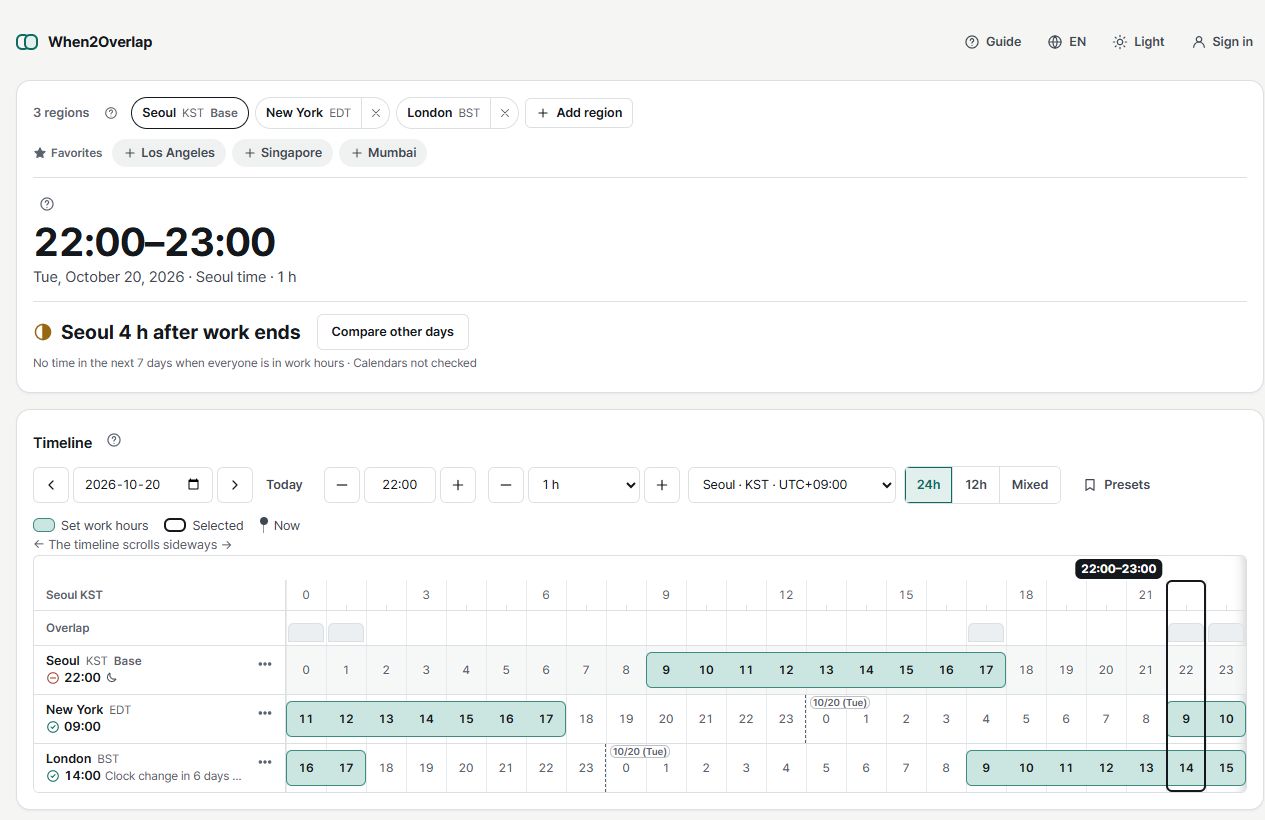
The redesigned interface runs through Selected meeting, Timeline, Suggestions and Share. Set work hours per region, inspect suggestion reasons and share up to three candidates.
Suggestions rank candidates under the supplied settings. The app explicitly says “sleep and unconnected calendars not included.” Work-hour overlap does not confirm personal availability or willingness to attend. Check the coverage and status of holidays, leave and calendars, then agree on the final time with participants.
The most well-known timezone tool, with a clean slider interface, Google Calendar, Outlook and iCal integration, and short links to share the exact view. Paid subscriptions ended in 2022, so every feature is free. Good for quick comparisons between 2–4 cities. We did not find automatic suggestions, custom work hours, or an overlap view.
Beautiful minimal design with a full-width timeline slider. Excellent for quickly visualizing "what time is it everywhere right now." The free viewer can share a link. Suggested meeting times, per-person work hours and iCal export are in the paid Pro plan. The free viewer is best for personal reference.
Part of the comprehensive timeanddate.com suite. Shows a table of hours color-coded by time of day for your chosen cities; you pick the slot yourself. You can add it to your calendar as an ICS file or share the page URL, and DST locations are marked with an asterisk. The web planner does not account for public holidays (the mobile app does). The interface feels dated, there's no drag interaction, no automatic suggestion, and no way to set custom work hours.
As of October 2026 the site appears to be unavailable, so we could not evaluate it.
Summary
| Tool | Auto Suggestions | Custom Hours | Multi-Slot | Cost | Best For |
|---|---|---|---|---|---|
| When2Overlap | ✓ | ✓ | ✓ | Free | Teams with 3+ timezones |
| World Time Buddy | — | — | ✗ | Free | Quick 2-city comparison |
| Every Time Zone | Pro | Pro | ✗ | Free + Pro | Personal reference |
| Time and Date | ✗ | ✗ | ✗ | Free | Picking from a color-coded table |
| World Clock Meeting | — | — | — | — | Unavailable |
Our pick: If you schedule meetings across 3+ time zones regularly, we recommend When2Overlap. It's a free tool that combines suggested times, per-region work hours, an overlap bar, and multi-slot proposals (up to 3 options in one link) — without requiring signup. For simple 2-city checks, World Time Buddy still works fine.
📄 Technical Reference
The scheduling heuristics behind When2Overlap — including Dynamic Comfort Curve, Weighted Multi-Timezone Scoring, and Fatigue Accumulation Model — are described in our published research paper:
Moon, J. (2026). Client-Side Heuristic Algorithms for Cross-Timezone Meeting Optimization: A Defensive Publication. Zenodo. https://doi.org/10.5281/zenodo.19258704
See why teams are switching to When2Overlap
When2Overlap suggests meeting times across any timezone combination — free, no signup.
Try When2Overlap Free