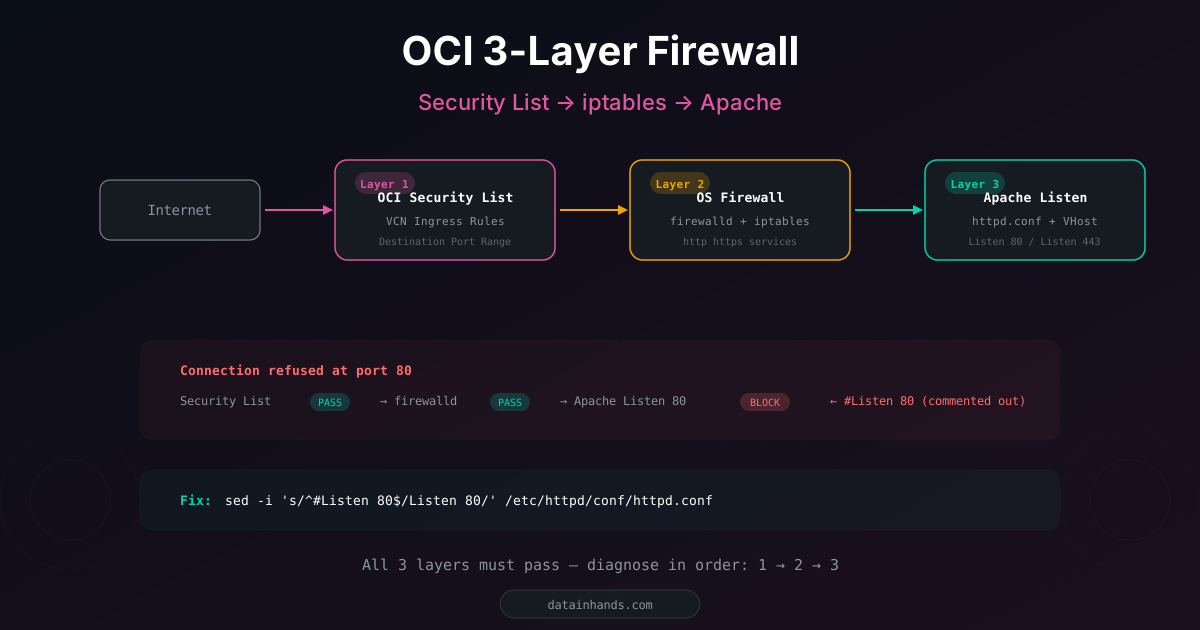
Ever opened a port on Oracle Cloud and it still doesn't work? Unlike AWS or GCP, OCI has 3 independent firewall layers. If any one is blocking, traffic never reaches your app.
This article documents a real "Connection refused" issue during subdomain deployment — and the systematic way to find which layer is the culprit.
The 3-layer structure
If traffic is blocked at any layer, everything after it is irrelevant. Always diagnose in order: 1 → 2 → 3.
Real case: port 80 "Connection refused"
HTTPS (443) works fine, but HTTP (80) is refused:
# 443: works
curl -v https:// -k --connect-timeout 10
# HTTP/1.1 403 Forbidden ← Apache responds (connection OK)

# 80: refused
curl -v http:// --connect-timeout 10
# Connection refused ← blocked somewhere
Layer-by-layer diagnosis
Check in OCI Console:
Networking → Virtual Cloud Networks → VCN → Subnets → Security Lists
→ Ingress Rules
Port 80 rule already existed. Layer 1: pass.
Source Port Range instead of Destination Port Range. Source Port is the client's ephemeral port. The server's listening port goes in Destination Port Range. Leave Source Port Range empty.
# firewalld services
sudo firewall-cmd --list-services
# dhcpv6-client http https ssh ← http present → pass

# iptables
sudo iptables -L -n | grep -E "80|DROP|REJECT"
# Only OCI metadata rules (169.254.x.x) → pass
Layer 2: pass.
# Check what Apache is actually listening on
sudo ss -tlnp | grep -E ":80 |:443 "
# Only 443! No 80! ← Found it

# Why?
grep -r "Listen" /etc/httpd/conf/ /etc/httpd/conf.d/ | grep -v "#"
# Only: Listen 443 https
# httpd.conf has: #Listen 80 (commented out)
OCI WAF handles HTTP→HTTPS redirects at the WAF level, so the server never needed port 80. But for a direct-connection subdomain, we need it:
sudo sed -i 's/^#Listen 80$/Listen 80/' /etc/httpd/conf/httpd.conf
sudo apachectl configtest && sudo systemctl restart httpd

# Verify
sudo ss -tlnp | grep ":80 "
# LISTEN 0 511 *:80 *:* ← fixed
Complete diagnostic checklist
| # | What | Command | Expected |
|---|---|---|---|
| 0 | DNS | dig domain +short | Server IP shown |
| 1 | Security List | Console → Ingress Rules | Port rule exists |
| 2a | firewalld | sudo firewall-cmd --list-services | http/https included |
| 2b | iptables | sudo iptables -L -n | grep DROP | No DROP for that port |
| 3 | Apache | sudo ss -tlnp | grep ":port " | LISTEN shown |
| 4 | Config | sudo apachectl configtest | Syntax OK |
| 5 | Logs | sudo tail -20 /var/log/httpd/error_log | No errors |
Special case: OCI WAF
When OCI WAF is in front of your server, the traffic path changes:
▸ HTTPS → server:443 → Apache
| Behavior | Explanation |
|---|---|
| Server port 80 not needed | WAF handles HTTP redirects |
| Direct IP access blocked | Security (prevent WAF bypass) |
| DNS points to WAF, not server | CNAME to xxx.o.waas.oci.oraclecloud.net |
Adding a direct-connection subdomain (A record to server IP) bypasses WAF. This means the server must handle ports 80/443 directly — and all 3 firewall layers must be checked.