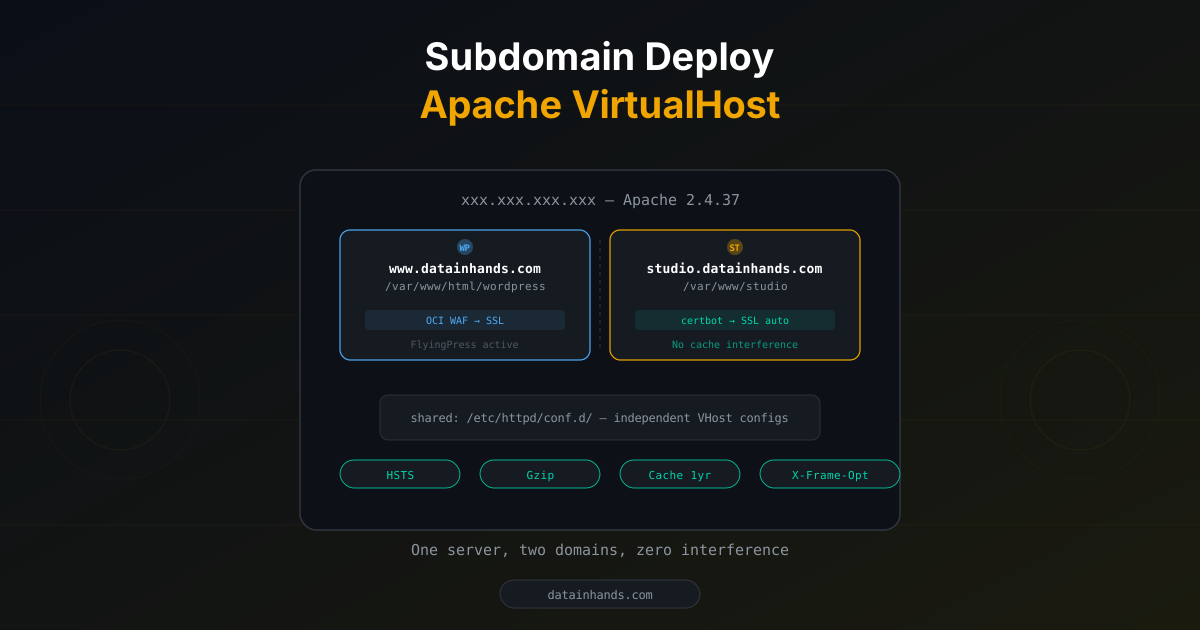
Sometimes you need to run a static web app alongside WordPress on the same server. Maybe a WordPress cache plugin (FlyingPress, WP Rocket) is interfering with your JavaScript app, or you simply want zero WordPress dependency.
The goal: add a subdomain without touching the existing WordPress installation.
Target architecture
▸ /var/www/html/wordpress
▸ SSL: WAF certificate
▸ /var/www/studio
▸ SSL: certbot auto-renew
WAF bypass vs WAF passthrough
If your main site runs behind OCI WAF, decide whether the new subdomain should also go through WAF.
| Scenario | Recommendation | Why |
|---|---|---|
| Static HTML, no sensitive data | Direct A record | certbot auto-renew, simple setup |
| Dynamic app, security required | WAF passthrough (CNAME) | DDoS protection, bot filtering |
| Escaping cache plugin interference | Direct A record | Full isolation from WordPress ecosystem |
Prerequisites: Apache port 80 listening
In OCI WAF setups, the server often doesn't listen on port 80 — WAF handles HTTP-to-HTTPS redirects. For direct connections, you need port 80.
# Check Apache listening ports
sudo ss -tlnp | grep -E ":80 |:443 "
# Only 443? Need to enable 80

# Uncomment Listen 80
sudo sed -i 's/^#Listen 80$/Listen 80/' /etc/httpd/conf/httpd.conf
sudo apachectl configtest && sudo systemctl restart httpdDeployment: 6 steps
Add studio A record → server IP, TTL 300.
dig studio.yourdomain.com @8.8.8.8 +short
# sudo mkdir -p /var/www/studio
echo "<h1>studio OK</h1>" | sudo tee /var/www/studio/index.html
sudo chown -R apache:apache /var/www/studio
sudo tee /etc/httpd/conf.d/studio.conf << 'EOF'
<VirtualHost *:80>
ServerName studio.yourdomain.com
DocumentRoot /var/www/studio
<Directory /var/www/studio>
Require all granted
</Directory>
</VirtualHost>
EOF
sudo apachectl configtest && sudo systemctl reload httpdsudo certbot --apache -d studio.yourdomain.comcertbot auto-creates: SSL VHost, HTTP→HTTPS redirect, renewal schedule.
# Add to studio-le-ssl.conf
Header always set X-Frame-Options "SAMEORIGIN"
Header always set X-Content-Type-Options "nosniff"
Header always set Strict-Transport-Security "max-age=63072000"

# Static assets: 1-year cache
<FilesMatch "\.(js|css|png|jpg|svg|woff2?)$">
    Header set Cache-Control "public, max-age=31536000, immutable"
</FilesMatch>

# Gzip compression
AddOutputFilterByType DEFLATE text/html text/css application/javascriptsudo cp -r studio-files/* /var/www/studio/
sudo chown -R apache:apache /var/www/studio/curl -sI https://studio.yourdomain.com | grep -E "HTTP|X-|Strict|Cache"
# HTTP/1.1 200 OK + security headers + cache headers
# Original site unaffected
curl -sI https://yourdomain.com | head -3WordPress plugin → standalone HTML conversion
If your JS app reads config via wp_localize_script:
// JS expects this global
const cfg = window.PatternStudioConfig || {};
// The || {} fallback means: no JS modifications needed
Just inject the config in index.html:
<script>
window.PatternStudioConfig = {
  version: '2.5.3',
  persistInput: false,
  locale: navigator.language,
  ai: { enabled: false }
};
</script>
<script src="assets/js/app.js"></script>Rollback
Remove the VHost config. WordPress is never touched:
sudo rm /etc/httpd/conf.d/studio.conf /etc/httpd/conf.d/studio-le-ssl.conf
sudo systemctl restart httpd