WordPress 사이트를 운영하는 서버에 정적 웹앱을 서브도메인으로 추가해야 할 때가 있습니다. 플러그인 캐시 문제(FlyingPress, WP Rocket 등)를 피하거나, WordPress 의존성 없이 독립 실행하고 싶을 때.
핵심은 기존 WordPress를 전혀 건드리지 않으면서 같은 서버에 별도 도메인을 추가하는 것입니다.
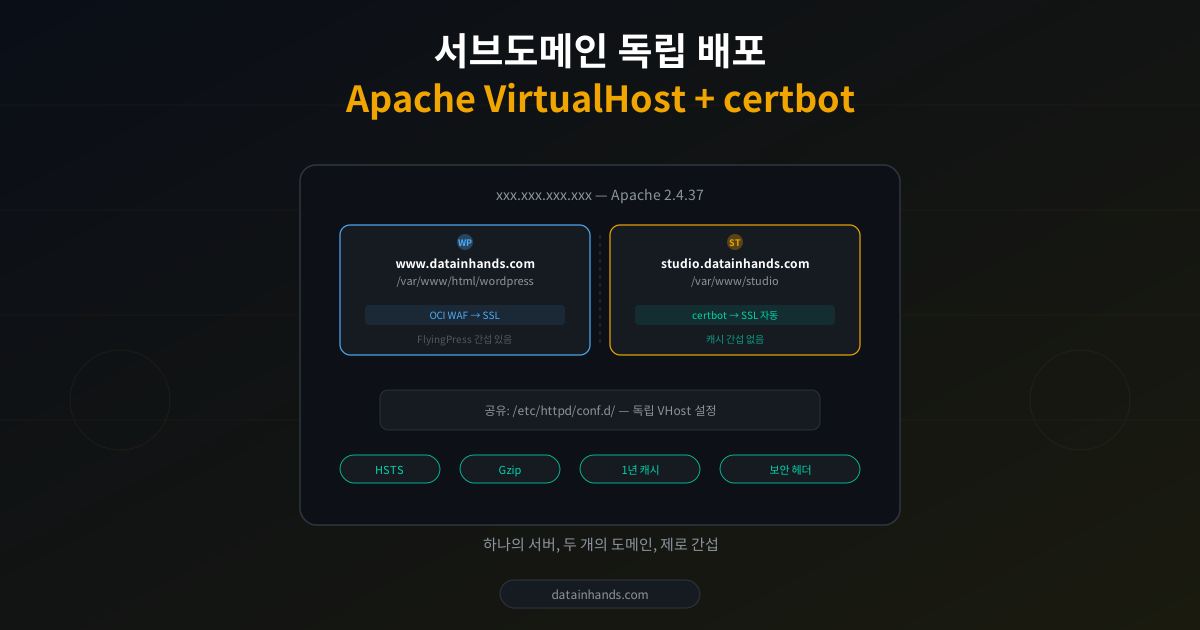
완성 아키텍처
xxx.xxx.xxx.xxx — Apache 2.4.37
www.datainhands.com
▸ OCI WAF 경유
▸ /var/www/html/wordpress
▸ SSL: WAF 인증서
▸ /var/www/html/wordpress
▸ SSL: WAF 인증서
studio.datainhands.com
▸ A레코드 직접 연결
▸ /var/www/studio
▸ SSL: certbot 자동갱신
▸ /var/www/studio
▸ SSL: certbot 자동갱신
WAF 경유 vs 직접 연결, 어떻게 결정?
기존 사이트가 OCI WAF 뒤에 있다면, 새 서브도메인도 WAF를 거칠지 결정해야 합니다.
# WAF 경유 확인
curl -sI http://www.datainhands.com | grep "Server"
# Server: ZENEDGE → OCI WAF 경유

# 서버 직접 접속 가능 여부
curl -v http://서버IP --connect-timeout 10
# Connection refused → 80 차단 (WAF만 통과)

curl -v https://서버IP -k --connect-timeout 10
# 200/403 → 443 직접 접속 가능| 조건 | 추천 | 이유 |
|---|---|---|
| 정적 HTML, 민감 데이터 없음 | 직접 연결 (A레코드) | certbot 자동갱신, 설정 단순 |
| 동적 앱, 보안 필수 | WAF 경유 (CNAME) | DDoS 방어, 봇 차단 |
| FlyingPress 등 캐시 회피 | 직접 연결 | WordPress 생태계 완전 분리 |
사전 준비: Apache 80 포트 리스닝
OCI WAF 환경에서는 서버가 80 포트를 닫아둔 경우가 많습니다. WAF가 HTTP→HTTPS를 대신 처리하니까요. 직접 연결 시 80이 필요합니다.
# Apache 리스닝 포트 확인
sudo ss -tlnp | grep -E ":80 |:443 "
# 443만 있으면 80 추가 필요

# httpd.conf에서 Listen 80 주석 해제
grep "Listen 80" /etc/httpd/conf/httpd.conf
# #Listen 80 ← 주석 처리됨

sudo sed -i 's/^#Listen 80$/Listen 80/' /etc/httpd/conf/httpd.conf
sudo apachectl configtest && sudo systemctl restart httpd
💡 OCI Security List도 확인: VCN → Subnets → Security Lists → Ingress Rules에서 TCP 80이 0.0.0.0/0에서 허용되는지 확인. Source Port가 아닌 Destination Port Range에 80을 입력해야 합니다.
배포: 6단계
1
DNS A레코드 추가
DNS 관리(name.com, Cloudflare 등)에서 studio A레코드 → 서버 IP. TTL 300.
dig studio.datainhands.com @8.8.8.8 +short
# <서버IP>
2
DocumentRoot + HTTP VHost
sudo mkdir -p /var/www/studio
echo "<h1>studio OK</h1>" | sudo tee /var/www/studio/index.html
sudo chown -R apache:apache /var/www/studio

sudo tee /etc/httpd/conf.d/studio.conf << 'EOF'
<VirtualHost *:80>
    ServerName studio.datainhands.com
    DocumentRoot /var/www/studio
    <Directory /var/www/studio>
        Require all granted
    </Directory>
</VirtualHost>
EOF

sudo apachectl configtest && sudo systemctl reload httpd
3
certbot SSL 발급 (한 줄로 끝)
sudo certbot --apache -d studio.datainhands.comcertbot이 자동으로: SSL VHost 생성 + HTTP→HTTPS 리다이렉트 추가 + 자동갱신 등록
4
VHost 최적화 (보안 헤더 + 캐시)
certbot이 생성한 studio-le-ssl.conf에 보안 헤더와 캐시 정책 추가:
# 보안 헤더
Header always set X-Frame-Options "SAMEORIGIN"
Header always set X-Content-Type-Options "nosniff"
Header always set Strict-Transport-Security "max-age=63072000"
Header always set Referrer-Policy "strict-origin-when-cross-origin"

# 정적 에셋 1년 캐시
<FilesMatch "\.(js|css|png|jpg|svg|woff2?)$">
    Header set Cache-Control "public, max-age=31536000, immutable"
</FilesMatch>

# Gzip 압축
AddOutputFilterByType DEFLATE text/html text/css application/javascript
5
앱 파일 배포
sudo cp -r studio-files/* /var/www/studio/
sudo chown -R apache:apache /var/www/studio/
6
검증
# studio 정상
curl -sI https://studio.datainhands.com | grep -E "HTTP|X-|Strict|Cache"
# HTTP/1.1 200 OK + 보안 헤더 + 캐시 헤더

# 기존 사이트 영향 없음
curl -sI https://datainhands.com | head -3
# HTTP/1.1 200 OK
WordPress 플러그인 → 독립 HTML 변환 팁
WordPress 플러그인 JS가 wp_localize_script로 설정을 받는 경우:
// JS에서 이렇게 사용 중
const cfg = window.PatternStudioConfig || {};
const persistEnabled = !!cfg.persistInput;
const aiCfg = cfg.ai || {};
|| {} 폴백이 있으면 JS 수정 없이 index.html에 설정만 삽입:
<script>
window.PatternStudioConfig = {
  version: '2.5.3',
  persistInput: false,
  locale: navigator.language,
  ai: { enabled: false }
};
</script>
<script src="assets/js/pattern-studio.js"></script>
✅ 핵심 이점: WordPress 캐시 플러그인(FlyingPress, WP Rocket 등)의 JS delay, RUCSS, CSS minify 등 최적화 간섭을 완전히 회피. 독립 도메인이라 WordPress 생태계와 무관하게 동작합니다.
롤백
문제가 생기면 studio.conf만 제거하면 됩니다. 기존 WordPress에 영향 제로:
sudo rm /etc/httpd/conf.d/studio.conf /etc/httpd/conf.d/studio-le-ssl.conf
sudo systemctl restart httpd